Where Do I Vote on Election Day? Search CanIVote.org

November 3, 2008

With Election Day fast approaching many voters are searching for answers to common voting related questions.

The most popular voting questions are:

Where do I vote?

What are voting hours / poll hours?

What time do the polls open?

Where are voting locations / polling locations?

Where am I registered to vote?

What are voting times?

Many voters are also searching for sample ballots and their local board of elections.

A great nonpartisan resource for finding out where to vote is CanIVote.org

Can I Vote

Can I Vote

Voters can search their respective state to find their local polling place.

According to CanIVote.org, “many election offices offer online services that match your address to your local voting site.”

I was able to locate my polling place via a search from via CanIVote.org and my State Election board’s website by providing my last name, birth date and and Zip Code.

Polling Place Locator Search

Polling Place Locator Search

Voters from every state should be able to find the answers they need about how and where to cast their vote on Election Day from the CanIVote.org website.

Submarining Local Business Listings in Google Maps with User Content

November 2, 2008

After reading Danny Sullivan’s post about his and Mike Blumenthal’s continued frustration with Google’s Local Business Center and its shortcomings, I went to check the status of my recent attempts to further manage my business listing and its details in Google’s Local Business Center.

I was surprised to learn my listing edits were disapproved for reasons which weren’t fully explained other than through a pop up which said: “This listing does not comply with our policy of allowed terms.”

Policy of Allowed Terms

Policy of Allowed Terms

I haven’t yet been able to locate their policy of allowed terms.

Fortunately and because the Google Local Business Center still has room for improvement – my business listing can be found in a Google or Google Maps search for Advanced Marketing Consultants Nichols Hills, OK.

Google Local Business Center Overview

Google Local Business Center Overview

However, so can my competitor’s “listings”.

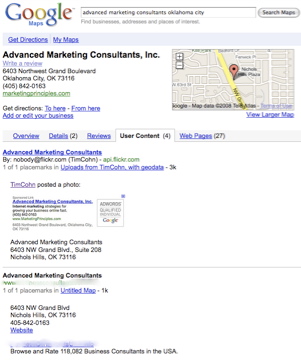
I was even more surprised to find information other than data directly related to my business inserted into both the Overview and User Content sections of my business listing by a “consultants directory” which effectively submarines my listing – not once but three times – all with the same “information” from the same “consultants directory”.

Marketing Consultants

Marketing Consultants

I am not sure these are the type of search results Google wanted to see occur when they opened up and allowed “user generated content” within Google Maps – yet these types of results are now appearing there.

How long will it take before every business category gets submarined by directories who spam Google Maps with their “Placemarks” on “Untitled Maps” under the auspices of “user content”?

Placemarks Untitled Maps

Placemarks Untitled Maps

I don’t know exactly how Google can stop spammers from generating “Placemarks” on “Untitled Maps” which in turn get published under unsuspecting business owner’s business listings.

Surely though since Google created the “User Content” system – they can also fix it.

Linkedin Plus Twitter Equals Who Knows What?

November 1, 2008

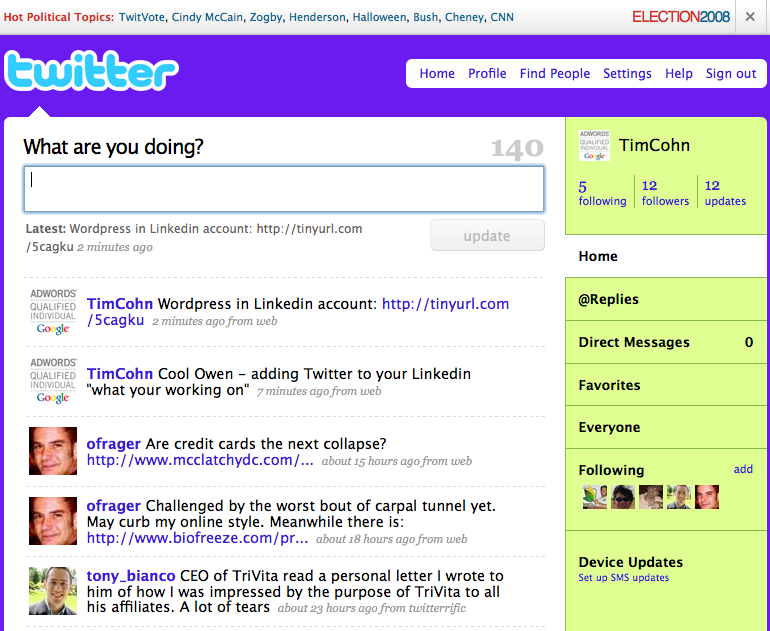
I just added my Twitter account into my Linkedin account profile after noticing Owen Frager had added it to his “what he is working on” Linkedin updates.

Twitter TimCohn

Twitter TimCohn

Pretty cool Owen…

Linkedin TimCohn

Linkedin TimCohn

I had been meaning for some time to write about the importance of “owning and controlling your brand” whether personal or corporate in the most promising emerging social platforms for both offensive and defensive purposes

Appropriately, I first became acquainted with Owen after having posted on Domain King Rick Schwartz’ blog

Name.com

Name.com

about how I missed the first offensive opportunity to control “my personal brand” – albeit my not so unique name – on that newfangled social platform called the world wide web way back in 1996.

Tim Cohn

Tim Cohn

Granted, its hard to gauge in advance which social platforms will have the largest audience and reach after filtering out all their noise.

However, not registering your “brand” in their databases early on can lead to remorse later on.

If you haven’t done so already, register your own brandname.com / companyname.com and create accounts for the same names in MySpace, Facebook, Twitter and Flickr – if you can…

The same holds true for individuals.

Sign up for a Linkedin account under your personal brand: your name.

Don’t be disappointed though if you can’t. If yours is a common name – it surely has long since been registered.

Registering your brands with these sites may not make you any money in the short term, but if and when social media platforms ever figure out how to make money for themselves let alone for their advertisers and users, wouldn’t it be better for you to control your brand name(s) on the most successful social media sites instead of someone else?

October 2008 WordPress Blog Traffic Stats

November 1, 2008

This blog: Search Marketing Communications generated its second highest month in terms of traffic during October 2008 with 11,664 views.

Previously, this WordPress blog’s highest trafficked month was September 2008 with 22,897 views.

Roughly half as many views occurred during October 2008 as compared with September 2008, however combined traffic totals from these two months alone have generated 34,561 views – slightly over 1/3 of all blog traffic received since inception.

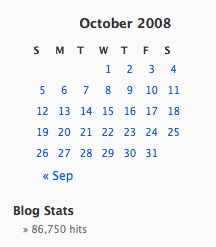
By the end of October 2008, cohn.wordpress.com had been viewed 86,750 times since its launch in September 2006.

In its first month of existence this blog had 1,593 total views.

October 2008 traffic was 7 times greater than September 2006 traffic.

Few people subscribe to this blog, thus the vast majority (an estimated 99% or greater) found this blog through some type of search query, which is why this blog is titled:

“Search Marketing Communications”

Search Traffic October 2008

Search Traffic October 2008

Second Largest Month Blog Search Traffic: 11,664 Views

October 2008 Total Blog Traffic

October 2008 Total Blog Traffic

Total Search Traffic October 2008

The Internet Flow Chart

October 31, 2008

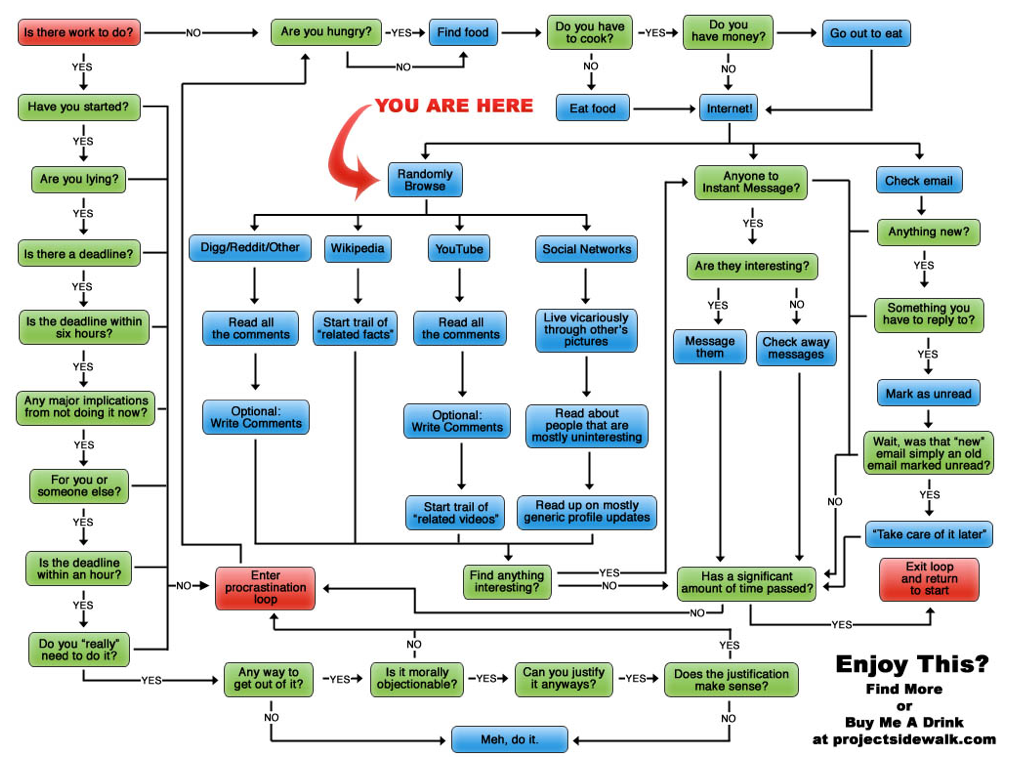
For those of you circling your desktop this Halloween trying to sneak up and scare your pile of work away to another day, here is a map with a schedule of what your work day may end up looking like.

internet Flowchart

internet Flowchart

Thanks to Mark Dilley for Tweeting this Internet Flowchart and to ProjectSidewalk.com for investing the time necessary to create it.

To get the full scale version of the internet flow chart click here.

Adwords Text Ad Composer Gadget: Eventually An Adwords Tool?

October 30, 2008

iGoogle has a large number of gadgets available for use within iGoogle accounts.

Google account holders can search for gadgets to add to their iGoogle home page from ten different categories.

Google gadget categories to select from:

* News
* Tools
* Communication
* Fun & Games
* Finance
* Sports
* Lifestyle
* Technology
* Politics

…and the newest Gadget category: * Editor’s picks.

I focus on several areas of interest while working online and I have used Google’s gadget search to locate gadgets for making my work easier.

A search for gadgets under Adwords produces four page of results.

I found an Adwords gadget I like and recommend called the Adwords Composer Tool.

Search For Gadgets Adwords

Search For Gadgets Adwords

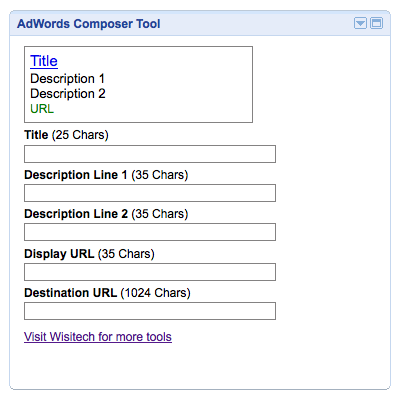
Once added to your iGoogle page, Google users can create and then test whether or not their Adwords ads meet Google text ads maximum characters per line criteria.

Adwords Widget

Adwords Widget

Each line of Google text ads allows the following maximum number of characters:

Ad Title: 25 characters

Ad Description Line 1: 35 characters

Ad Description Line 2: 35 characters

Ad Display URL: 35 characters

Ad Destination URL: 1,024 characters

With the Adwords Gadget, Adwords advertisers can compose mock ads without having to log in to their Google Adwords account.

It would be great if Google would add an ad composition tool to their set of Google Adwords Tools and then make it available externally like they when they created their “Adwords External Keyword Suggestion Tool“.

Until then, this Adwords ad composer gadget from Wisitech will do.

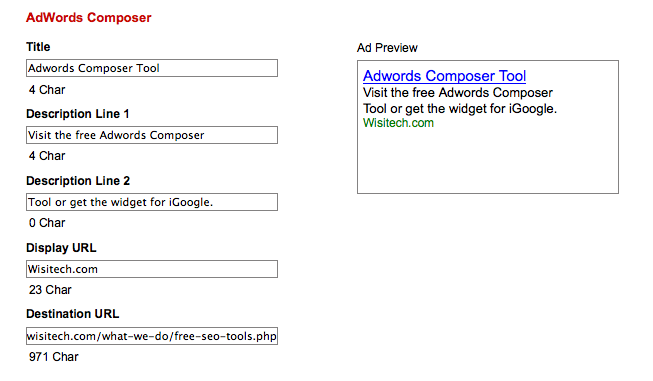
Adwords advertisers can also go to Wisitech’s web site to use the tool if they prefer.

Adwords Composer

Adwords Composer

Search Gadgets to add the Adwords Composer tool to your iGoogle account or visit Wisitech.com to find their Adword text ad composer tool along with the several other Adwords tools they offer.

Adwords Ad Composer Tool

Adwords Ad Composer Tool

Linkedin Applications: Add A WordPress Blog To Your Linkedin.com Profile

October 29, 2008

Several years ago Christian Mayaud invited me to join Linkedin.

When I created my account, little did I know Linkedin.com would go on to become the defacto online business networking site – the Myspace and Facebook for working adults.

As with most new technology tools, I was slow to fully embrace Linkedin’s potential power simply because I wanted to make sure my use of Linkedin would produce results I couldn’t otherwise produce for myself.

With time as the ultimate proving ground, the Linkedin network has increasingly become worth further investment.

In a previous post, I wrote about how to join and initiate a Linkedin Groups discussion.

The Linkedin Groups tool has helped me reach and connect with Google Adwords Professionals worldwide – a group I wouldn’t have had access to otherwise.

The ability to have discussions about Google Adwords with other practitioners around the globe has more than justified the time required to learn and use Linkedin’s tools.

Today nearly a year after seeking collaboration with outside developers, Mountain View, CA based Linked has announced eight external applications have been integrated for use within Linkedin.com

From the new Linkedin Applications page:

“LinkedIn Applications enable you to enrich your profile, share and collaborate with your network, and get the key insights that help you be more effective. Applications are added to your homepage and profile enabling you to control who gets access to what information.”

The eight Linkedin Applications are: Reading List by Amazon, Box.net Files, Company Buzz, Google Presentation, Blog Link, SlideShare Presentations, My Travel and of course – WordPress, hence this blog post.

I have added my blog Cohn.Wordpress.com to my Linkedin.com profile.

Adding a WordPress blog to a Linkedin account is easy to do and can be done in just four simple steps:

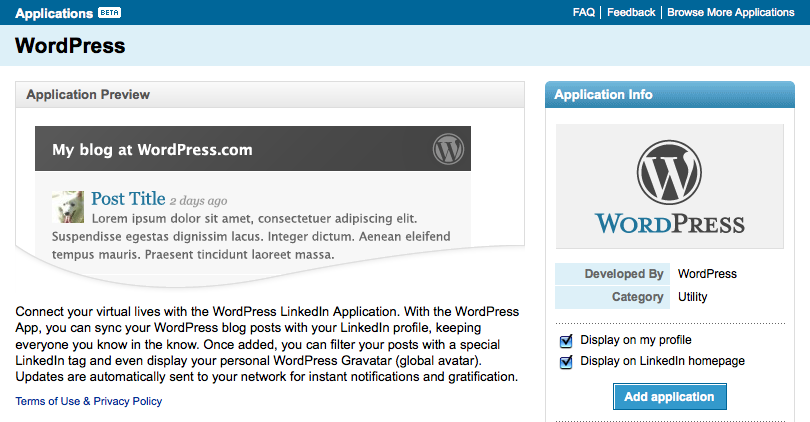
1. Click on the Linkedin Applications page and click on the WordPress icon.

Linkedin WordPress

Linkedin WordPress

2. Click add application and check whether or not you would like your WordPress blog displayed on your profile page and homepage.
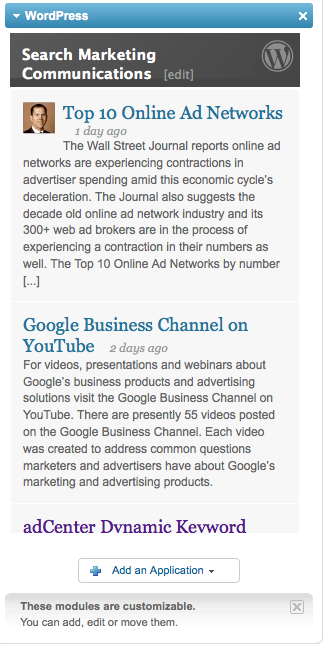
Linkedin Cohn.Wordpress.com

Linkedin Cohn.Wordpress.com

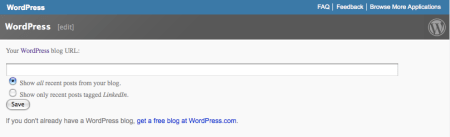
3. Enter your WordPress blog address. Check whether you want all of your recent posts displayed or just posts tagged with Linkedin.

Linkedin Cohn.Wordpress.com Blog Posts

Linkedin Cohn.Wordpress.com Blog Posts

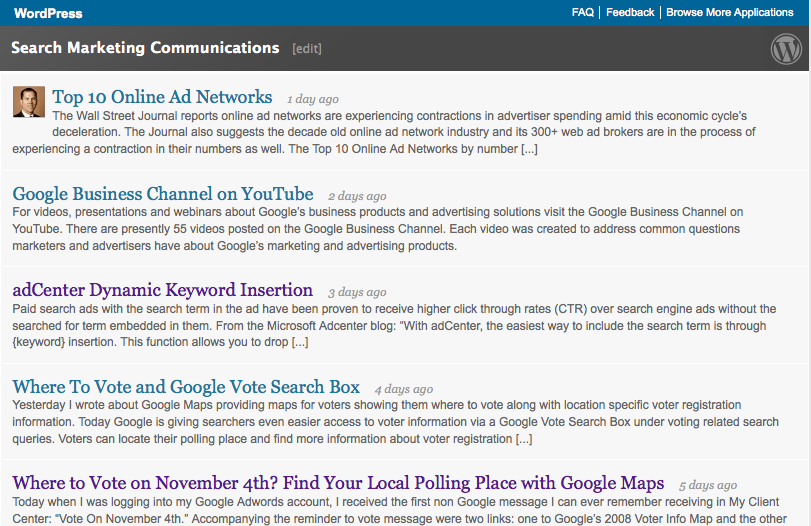
4. Save your settings and you will see your WordPress.com blog feed displayed with your previous selections featured.

Linkedin Profile

Linkedin Profile

Upon completion of these steps, visitors who view your Linkedin profile and home page (if selected) will see your WordPress blog posts.

Adding any one of these external applications to your Linkedin account can only help expand the network effects Linkedin delivers to its still growing community.
Top 10 Online Ad Networks

October 28, 2008

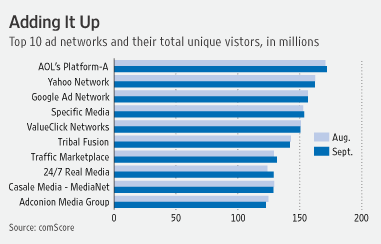
The Wall Street Journal reports online ad networks are experiencing contractions in advertiser spending amid this economic cycle’s deceleration.

The Journal also suggests the decade old online ad network industry and its 300+ web ad brokers are in the process of experiencing a contraction in their numbers as well.

The Top 10 Online Ad Networks by number of unique visitors according to comScore are:

Top 10 Online Ad Networks

Top 10 Online Ad Networks

1. AOL’s Platform A

2. Yahoo Network

3. Google Ad Network

4. Specific Media

5. ValueClick Networks

6. Tribal Fusion

7. Traffic Marketplace

8. 24/7 Real Media

9. Casale Media Network

10. Adconion Media Group

In this industry’s contraction, will the reduction in the 300+ online ad networks reduce the overall supply of online ad availability to ad buyers?

Or will the industry’s excess ad supply end up being provided for out of its surviving web ad brokers inventory?

My guess is no one but those who once worked for the soon to be shuttered web ad brokers will notice they have stop supplying ads.

Google Business Channel on YouTube

October 27, 2008

For videos, presentations and webinars about Google’s business products and advertising solutions visit the Google Business Channel on YouTube.

Google Business Channel

Google Business Channel

There are presently 55 videos posted on the Google Business Channel.

Each video was created to address common questions marketers and advertisers have about Google’s marketing and advertising products.

adCenter Dynamic Keyword Insertion

October 26, 2008

Paid search ads with the search term in the ad have been proven to receive higher click through rates (CTR) over search engine ads without the searched for term embedded in them.

From the Microsoft Adcenter blog:

“With adCenter, the easiest way to include the search term is through {keyword} insertion. This function allows you to drop the term from the search box straight into your ad.”

If inserting the keyword will likely take an ad over its 25 character limit for titles or the 70 character limit for descriptions – use default text in the ad.

Default text is then used in advertiser’s ads whenever their ads would otherwise exceed character limits.

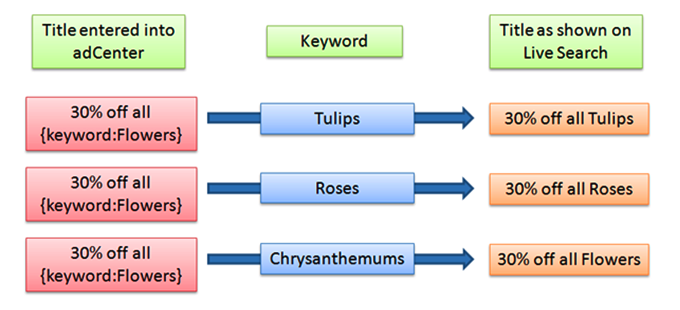
If an ad title is “30% off all {keyword} ” and one of the {keyword} variables is “Chrysanthemums,” the resulting ad title, “30% off all Chrysanthemums,” would exceed the character limit for ad titles and as a result, the ad would not be displayed.

However, by using default text in the ad title, advertisers can keep their ad text within the allowable character limit. If the ad title is “30% off all {keyword:Flowers} ” and someone searches by using the keyword “Chrysanthemums,” the ad title would be displayed as “30% off all Flowers”.

Adcenter Dynamic Keyword Insertion

Adcenter Dynamic Keyword Insertion

Use dynamic keyword insertion in conjuction with default text to increase ad relevance and increase paid search advertising click through rates.