Archive for the ‘Google’ Category

Google Business Channel on YouTube

October 27, 2008

For videos, presentations and webinars about Google’s business products and advertising solutions visit the Google Business Channel on YouTube.

Google Business Channel

Google Business Channel

There are presently 55 videos posted on the Google Business Channel.

Each video was created to address common questions marketers and advertisers have about Google’s marketing and advertising products.

Where To Vote and Google Vote Search Box

October 25, 2008

Yesterday I wrote about Google Maps providing maps for voters showing them where to vote along with location specific voter registration information.

Today Google is giving searchers even easier access to voter information via a Google Vote Search Box under voting related search queries.

Where To Vote

Where To Vote

Voters can locate their polling place and find more information about voter registration via Google searches with these voting related phrases like these: “absentee voting”, “register to vote”, “register vote”, “vote location”, “vote locations”, “vote registration”, “voter registration” and “where do i vote”.

Americans who have internet access and can type a search into Google’s Vote Search Box should be able to find all the voting related information they need cast their vote on November 4th.

Google Zeitgeist: Is Reverse Polling As Good At Predicting The Next President of the United States As Traditional Pollsters?

October 23, 2008

If you haven’t visited Google’s Zeitgeist recently, it now invites visitors to “take a look inside the world of search” via one of Google’s four search tools: Google Trends, Trends for Websites, Insights for Search and Hot Trends.

According to Google, “Zeitgeist” means “the spirit of the times”.

Google’s search tools reveal “the spirit of the times” through the aggregation of millions of search queries Google receives every day.

Isn’t the data Google culls from millions of search queries and their resulting Zeitgeist’s “spirit of the times” in effect – Reverse Polling?

Granted; searches for presidential candidates aren’t necessarily purchase proxies like those inherent in transactional related searches – or are they?

Through our votes aren’t we buying one candidate instead of another and then paying for both the newly elected and their predecessors’ policies via local, state and federal tax code?

Maybe one day we can shop for and elect officials online, but until then – we will have to settle for searching a candidates’ “product” features and benefits via all the various media available online including news, blogs and candidate websites.

Thus and barring concerns about the US Economy, few other topics symbolize the spirit of the times more here in the US than the upcoming United States Presidential election.

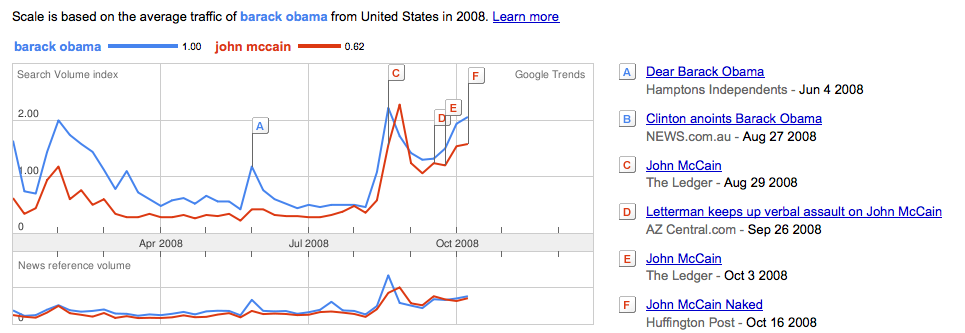
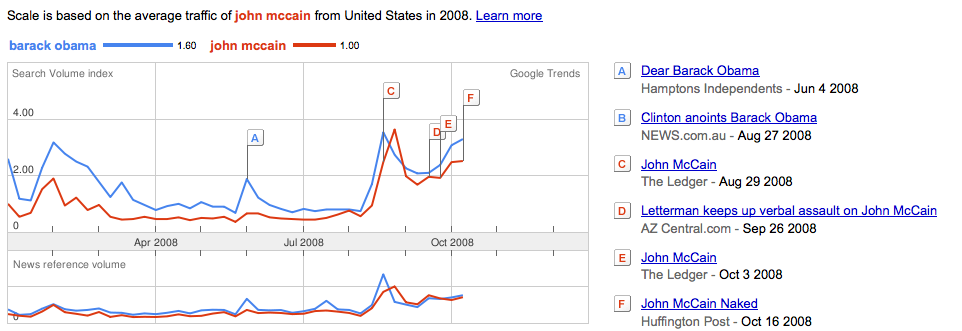
In keeping with the spirit of the times, below are two Google graphs illustrating how often each presidential candidate’s name has been searched compared to the other candidate with the difference calculated in ratios.

Barack Obama Searches

Barack Obama Searches

According to this Google graph, John McCain receives .62 searches for every Barack Obama search.

John McCain Searches

John McCain Searches

The same search data explained another way shows Barack Obama receives 1.62 searches for every search John McCain receives in Google.

Yesterday, the Wall Street Journal published their most recent presidential poll which has a graph that somewhat resembles Google search data for both candidates.

Wall Street Journal Poll

Wall Street Journal Poll

Further Google tool research for both candidates websites even more closely mirrors the recent Wall Street Journal presidential poll results.

BarackObama.com JohnMcCain.com

BarackObama.com JohnMcCain.com

Google search data indicates BarackObama.com has received 1 search for every .32 JohnMcCain.com searches.

And again – the search data appears to closely mirror the Wall Street Journal presidential poll findings.

BarackObama.com Searches

BarackObama.com Searches

The same search data presented for McCain searches shows JohnMcCain.com receives one search for every 3.2 BarackObama.com searches.

JohnMcCain.com Searches

JohnMcCain.com Searches

Have not Voters’ presidential candidate preferences already manifested in Google search data?

If so, what search factors potentially skew the predictive qualities of Google data?

In my next “Google Presidential Poll” post, I will take a crack at answering the above questions while also delving more deeply into where and how voters’ presidential candidate preferences have already materialized in Google search data as well as provide additional reasons why I think Google data has reached parity with traditional pollster data – at least on the national level.

Firefox Beta 3.1, Google Search and Poll Daddy

October 15, 2008

I have downloaded and started using Firefox Beta 3.1 and I’ve immediately noticed some new features.

Search terms are now highlighted in search results pages.

Google 3.1b1

Google 3.1b1

This feature highlights searched for terms in bold wherever they appear within the search results page.

By reducing the eye focusing labor required in the browsing process, Firefox Beta 3.1 makes searching for and finding what you are looking for much easier.

Search terms are highlighted in search results within Google, Yahoo, MSN and Ask.

I haven’t yet checked site search or any other search engine.

Firefox 3.1b1

Firefox 3.1b1

In Firefox 3.1, when a RSS is available from a particular site, the RSS icon is displayed in the far right end of the address bar.

Displaying the RSS button in the address bar makes subscribing to any web site’s feed far easier than hunting down the RSS button within a particular site.

Firefox Beta 3.1 Address Bar RSS

Firefox Beta 3.1 Address Bar RSS

RSS feed sources aren’t often easily located through a site’s internal search.

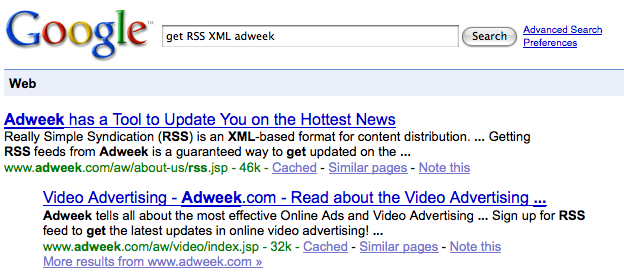
If I haven’t been able to locate a site’s syndication button from within a couple of clicks of a site’s home page, I will search Google for RSS XML and the domain name or business publication I want a subscription to.

The Google search query looks like this: “get RSS XML Adweek”

Google Search RSS XML

Google Search RSS XML

This type of search query will usually produce the RSS feeds page address – if there is one – within the first two search results for any web site – large or small.

Firefox Beta 3.1 new features make browsing more intuitive and working online more efficient.

Take the Firefox Beta 3.1 poll with the new WordPress Poll Daddy polling tool:

Adwords Examples on Google Maps

October 11, 2008

I was giving a presentation in Utah last week using Google Local Search and Google Maps as examples which evidently included new distribution points for Adwords advertising.

In the examples below, you can see an Adwords ad displayed in two locations in both types of Google Maps products being searched.

A search for Trump Soho Hotel in Google Maps produces two Adwords advertisers ads – one in the top left corner above Google’s local search results with the other ad below the map itself.

Trump Soho Hotel Google Maps

Trump Soho Hotel Google Maps

The same search in Google Street View also generates two Google Ads in the same locations as in the Google Map view search.

Trump Soho Hotel Google Maps Street View

Trump Soho Hotel Google Maps Street View

Its not clear to me as a Google Adwords advertiser just how I can get my ads distributed and displayed in these local map search results.

None of my geo-targeted Adwords campaigns are generating these types of ad distribution results.

Customized Search Results

October 10, 2008

Google has started delivering customized search results for local searches.

Customized Search Results

Customized Search Results

How does Google decide which queries are getting which area’s results?

If I were to venture a guess, I would say they will begin distributing search results within a scheme similar to Nielsen’s Designated Market Areas (DMA).

The timing for this new type of search result appears to coincide with the present United States economic cycle.

More about Google’s new customized search results:

Search Customization Details

Search Customization Details

Search Customization Details

Targeting iPhone Users with Google Adwords

October 9, 2008

Adweek reports Google has had discussions with ad agencies regarding advertisers targeting their ads to iPhone users specifically via Google Adwords.

While in Utah yesterday, my fly fishing guide Justin Harding and I noticed when using Google search from his iPhone Google Adwords advertising was sparse.

Initially, I thought it was because of the type of search we had ran.

However, after further investigative searches under highly competitive and advertised keywords, we weren’t ever able to see Adwords sponsored links on the right rail – only above the first search result.

Can a iPhone Google search display more than two Adwords advertisers ads as is now?

We weren’t able to generate any.

How is Google parsing iPhone search ads results for display? If they are, is Google distributing advertising to the iPhone with the same formula they use for displaying search results elsewhere?

Are iPhone screen real estate limitations the reason why we could only get two ads?

Even when we rotated the search results screen for horizontal viewing – under a Google search term that would typically have had up to ten sponsored links ( both above the search results and running down the right rail ) we were only able to generate two Adwords advertisers ads.

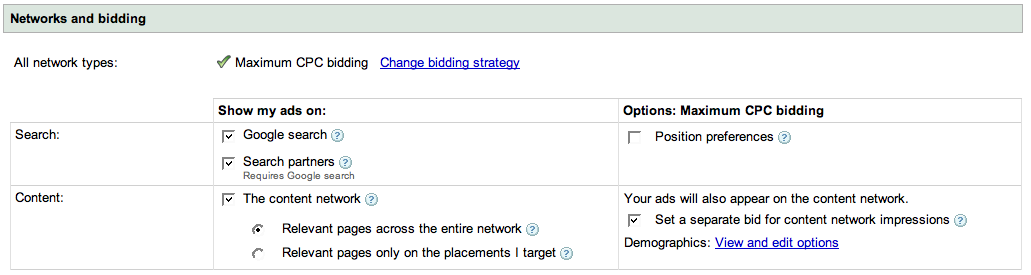
Will Google Adwords advertisers soon be able to select “iPhone” as a search distribution option along with “Google Search” and “Search Partners” within their campaigns Networks and bidding settings?

With 10 million iPhones in use and Apple’s iPhone supplying Google with its largest source of mobile search traffic, adding iPhone distribution to Google advertising campaigns will give Google Adwords advertisers another way to target and reach an increasingly mobile search audience.

Google Network Options

Google Network Options

One Google Search, Two YouTube Video Results

October 6, 2008

Google continues to experiment with universal search – displaying two videos side by side when queries have more than one relevant video result.

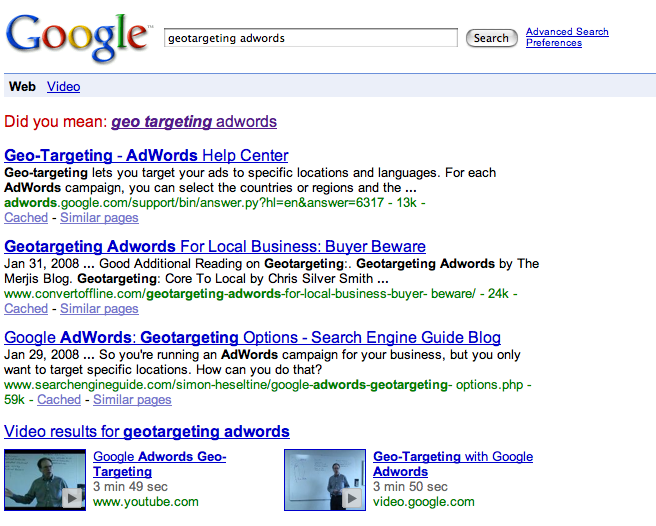
A search for “geotargeting adwords” produces the following search result:

Geotargeting Adwords Two Video Results

Geotargeting Adwords Two Video Results

Has Google determined this particular spelling of “geotargeting adwords” – as two words – warrants displaying two video results for any particular reason?

It appears so.

By placing the two video results horizontally, Google has also increased the total number of search results displayed for this particular search from ten results to eleven.

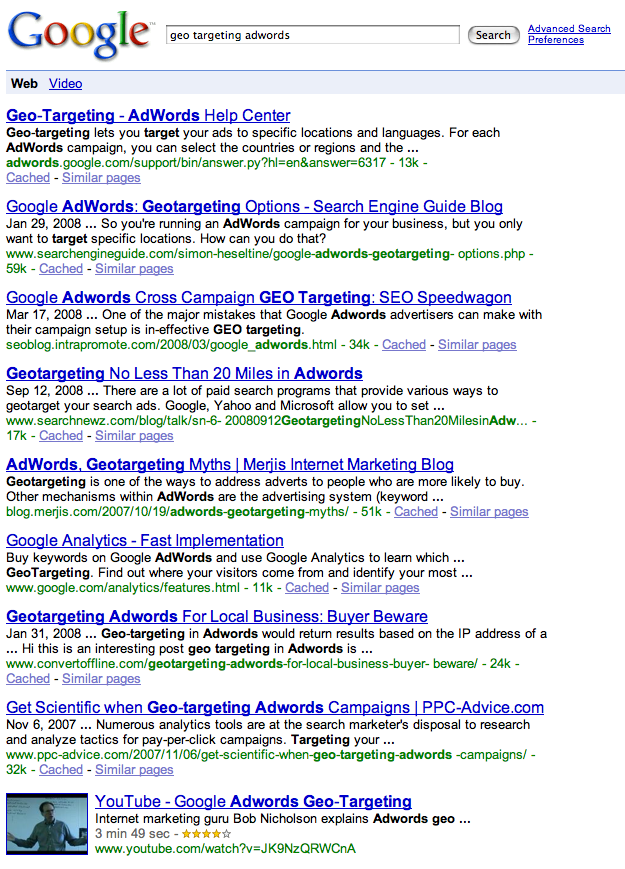
Yet, a search for “geo targeting adwords” – as three separate words – still continues to produce a single video link within Google’s universal search result – albeit much further down the page.

Any idea why the two word query generates two video results while the three word query gets just one?

Google Search Results One Video

Google Search Results One Video

Search Advertising Geo Targeting Options

October 3, 2008

If targeting local and mobile search advertising is the future growth drivers for search advertising providers, then Google and its Adwords geo-targeting features are in the driver’s seat when compared to its three closest search advertising rivals Yahoo, Microsoft and Ask.com.

Below I outline each providers’ offerings not according to their search advertising market share but instead according to their level of geotargeted advertising product development.

Google’s advertising product and its geo-targeting capabilities have one distinct yet obvious feature the other’s lack:

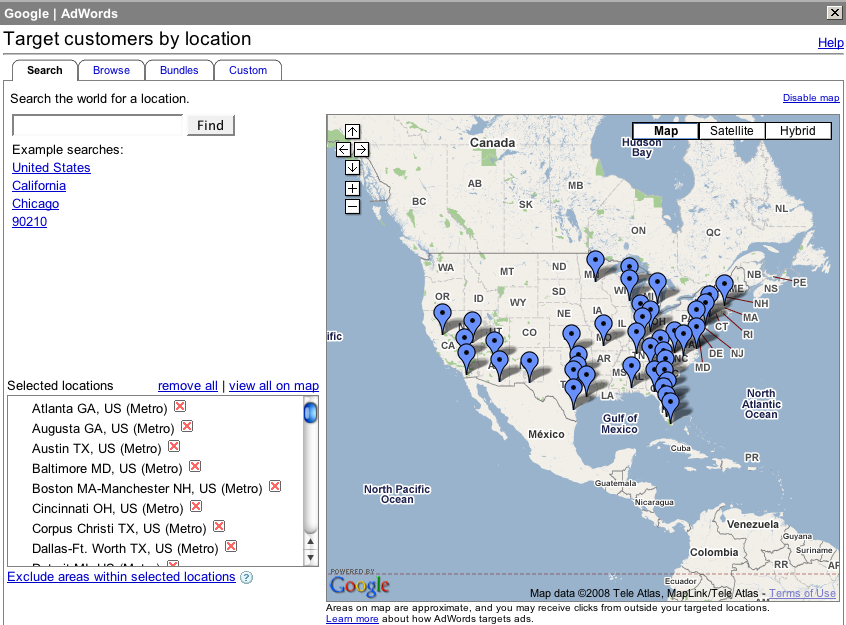
An actual map for geo-targeting the location of your ads and where they will be shown!
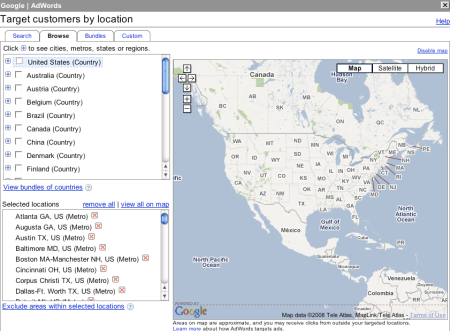
Google Search Advertising Country Geotargeting

Google Search Advertising Country Geotargeting

With Google Adwords, advertisers can target their ads one country at a time through Google’s Country Geotargeting tab, or choose to bundle their ads for display in multiple countries at once with Adwords Bundle Geotargeting feature.

Google Search Advertising Bundle Geotargeting

Google Search Advertising Bundle Geotargeting

Google Search Advertising Bundle Geotargeting

Google Search Advertising Metro Geotargeting

Google Search Advertising Metro Geotargeting

Google Adwords advertisers who advertise in specific markets nationally or regionally can target their ads by metropolitan area or by city.

Although not referenced, Google’s metropolitan area targeting looks slightly similar to the Designated Market Area system developed by Nielsen Media Research which incorporates Nielsen’s broadcast media markets and distribution scheme.

For its City geotargeting option, Google surrounds the target city with a square.
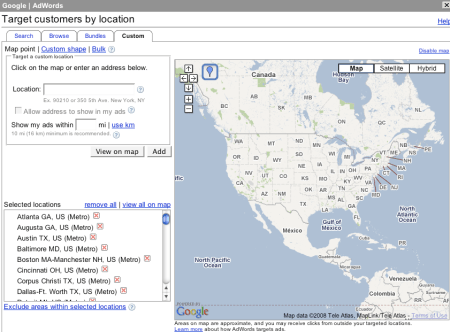
Google Search Advertising Custom Geotargeting

Google Search Advertising Custom Geotargeting

Google custom geotargeting by far provides the highest level of geotargeting available from any search advertising provider.

Custom geotargeting lets advertisers create their own custom advertising distribution area within any market.

Google search advertisers can simply point and click three or more points on their advertising map and Google does the rest for them – creating a custom advertising distribution area through latitude and longitude coordinates.

How do the other search advertising providers’ geo-targeting features stack up compared with Google’s?

Yahoo and Ask both offer advertising geo-targeting options but both to a lesser degree.

Yahoo Search Advertising Geotargeting

Yahoo Search Advertising Geotargeting

Yahoo offers geotargeting to it advertisers by account market area and specific regions. Account market area is established by the advertising account holder when the open their account. Both account market area and specific region areas are organized by country, state, province or territory.

The Yahoo specific region feature geotargets its advertising through the Designated Market Areas system licensed from Nielsen Media Research.

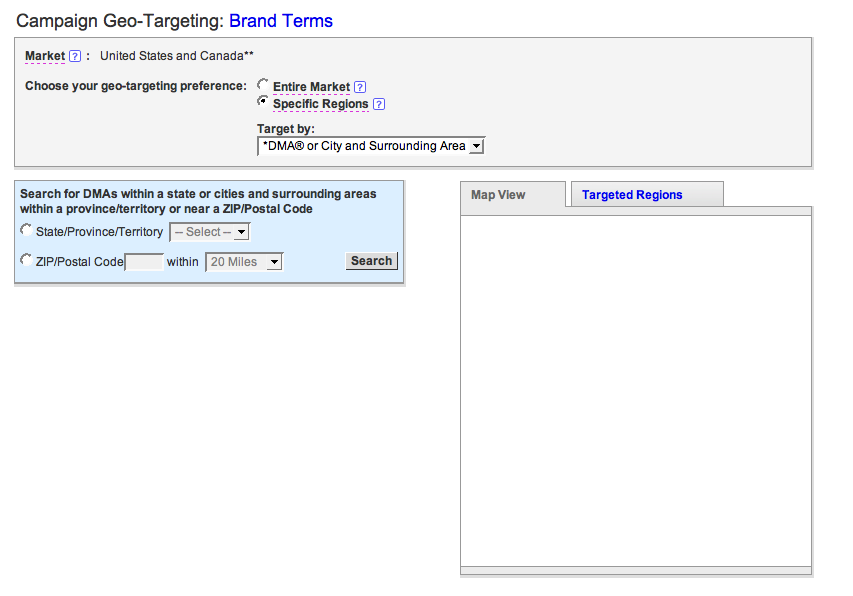
Yahoo Search Advertising Geotargeting Mapview

Yahoo Search Advertising Geotargeting Mapview

Where is the Yahoo Search Advertising Geotargeting Map?

Yahoo offers a Map View tab of specific regions geotargeted by its advertisers yet I haven’t ever been able to view an actual Yahoo map showing where my advertising has been geo-targeted and placed.

I can’t imagine why Yahoo search marketing would place a “Map View” tab in their Campaign settings geo-targeting page yet not actually provide a map view.
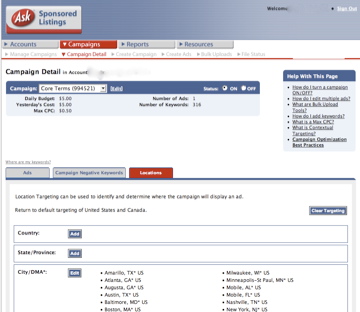
Ask Search Advertising Geotargeting

Ask Search Advertising Geotargeting

Ask provides its advertisers with Location targeting which is also based on Nielsen’s Designated Market Area system.

Ask doesn’t provide a map showing advertisers locations of their geo-targeted advertising.

However, and to its credit – Ask does provide a geotargeting feature direct marketers like myself would like to see from other search advertising providers like Google Adwords – Postal Code targeting.

Postal Code Targeting or Zip Code targeting here in the US would allow direct marketers and brands alike another level of advertising targeting, delivery and thus control.
At this point you may be wondering why I chose to cover Microsoft’s adCenter search advertising geotargeting product last even though it has a larger share of the search market than Ask.

Why have I listed Microsoft’s advertising geotargeting product development last?

Because Microsoft’s search advertising product does not offer its advertisers geotargeting options let alone any other kind of geographic ad targeting.

Microsoft Search Advertising Geotargeting

Microsoft Search Advertising Geotargeting

Will Microsoft ever offer advertising geo-targeting features to its advertisers?

If not, why?

Google Adwords Presentation: Jon M. Huntsman School of Business

October 2, 2008

I am giving a presentation on Google Adwords Oct 08-09, 2008 in Logan, Utah at Utah State University’s 18th Annual Customer Service & Marketing Seminar.

Customer Service Marketing Seminar

Customer Service Marketing Seminar

Utah State University’s Customer Service and Marketing Seminar is organized and produced by the University’s Partners in Business program at the Jon M. Huntsman School of Business.

I would like to thank Cameron Oliver for extending me an invitation to speak at his group’s event.

Partners In Business

Partners In Business

I accepted Cameron’s invitation to speak about Google Adwords in the Utah market for several reasons.

The determining factor which ultimately lead to my decision to agree to speak to a Utah audience about Google Adwords was of course – data from Google itself.

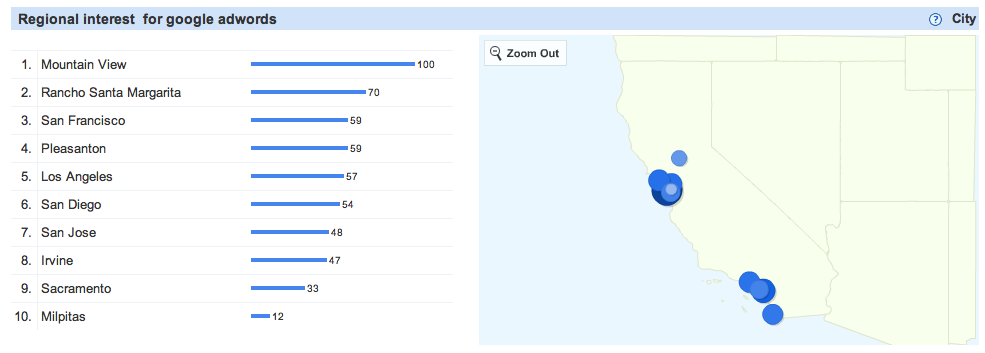
According to Google’s Search Volume Index, information about Google Adwords is sought by more searchers from Utah than from any US state other than Google’s home state of California.

Google Adwords Regional Interest

Google Adwords Regional Interest

As you can see, California scores a 100 in Google’s Search Volume Index for Google Adwords followed closely by Utah’s 93.

Google’s Search Volume Index tool also confirms search interest in the Google brand is highest in Mountain View, CA where Google has its headquarters.

Google Adwords California Search

Google Adwords California Search

Google’s Search Volume Index is an excellent tool for visualizing whether any market demand exists in any particular region of the world for products and services – or not.

Google data says people in Utah are interested in Google Adwords – so Utah – here I come!

I will be speaking twice at the Customer Service and Marketing Seminar on October 8th first at 9:45 and then again @ 2:30.

Customer Service Marketing Seminar Schedule

Customer Service Marketing Seminar Schedule

The title of my 50 minute presentation is: Google Your Business and Marketing!

Below is an overview of my presentation and the topics I plan to cover.

Overview:

Harness the power of Google to grow your business!

An increasing number of buyers are first turning to Google to research products and services before they purchase.

Make sure your business comes up in Google when searchers are deciding where and who they should buy from.

This presentation will show both small and medium size businesses how they can implement Google-specific search engine marketing and optimization techniques to get more buyers, larger sales more often.

Learn how to:

Target your prospects online instead of off-line for measurable results.

Transform your business into a modern marketing machine.

Speak with your customers in their language, the language they understand and prefer.

Tap Google Adwords to reach your prospects when and where they want to be reached.

Acquire new business more rapidly and efficiently through marketing on Google.

Reduce your customer acquisition and retention cost.

I am looking forward to speaking about Google Adwords and presenting “Google Your Business and Marketing” at Utah State University’s 18th Annual Customer Service & Marketing Seminar.