Archive for the ‘Google Adwords’ Category

Ad Scheduling Example

September 23, 2008

Google Adwords lets advertisers adjust their ad display times at the campaign level through its “Edit Campaign Settings” ad scheduling and serving section.

Ad Scheduling Serving

Ad Scheduling Serving

This feature can be beneficial for business-to-business advertisers who primarily generate leads and sales Monday through Friday.

Businesses who have identified unique time periods where search traffic and conversions peak and trough can also benefit.

Most businesses I have been involved with experience search traffic and conversion troughs on weekends.

However, I have some clients who generate more search traffic and book more sales on Saturday and Sunday than they do during any other day of the week.

The first step to determine whether your business can benefit from ad scheduling and the initial savings it can bring is to begin capturing and measuring your online traffic and conversions to identify any traffic and sales patterns.

It’s the odd – albeit – the great business – who produces business every hour of every day.

Does your advertising produce the most results during business hours or after business hours? Or, does your advertising produce leads and sales in some combination thereof?

If any patterns develop within your data, you can use the Google Adwords ad scheduling tool to optimize the performance of your advertising to reach prospects at the times they will most likely be in the market for your products or services.

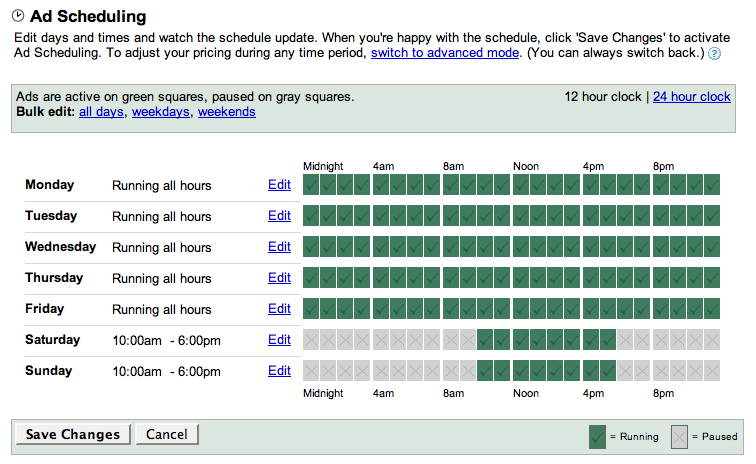
Ad Scheduling

Ad Scheduling

Ad Scheduling

With Google Adwords, you can edit days and times to see how the schedule updates. When you’re happy with the schedule, click ‘Save Changes’ to activate Ad Scheduling. To adjust your pricing during any time period, use the advanced ad scheduling mode.

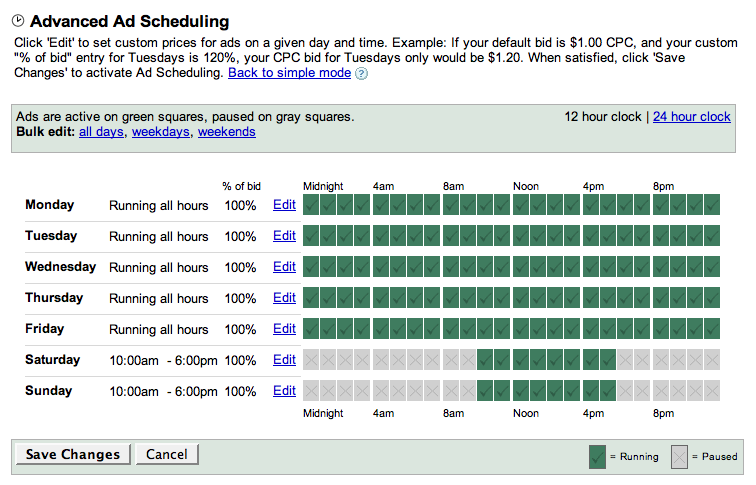
The Advanced Ad Scheduling feature can be used to increase bids during times when competition for your product and its demand are the greatest.

Advanced Ad Scheduling

Advanced Ad Scheduling

Click edit to set custom prices for ads on a given day and time. Example: If your default bid is $1.00 CPC, and your custom “% of bid” entry for Tuesdays is 120%, your CPC bid for Tuesdays only would be $1.20.

Both Google Adwords ad scheduling tools give advertisers more control over how advertising dollars are apportioned which is just one requisite for advertisers who want to begin managing their return on advertising investment.

Search Network Quality Score 10: Content Network 0

September 22, 2008

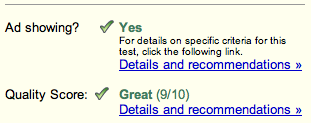
Adwords new Quality Scores have been live since September 17 according to Ophir Cohen.

Nuno Macedo of Páginas Amarelas Portugal has provided me with a screen shot of his Adwords Quality Score of 10 in Portuguese no less.

Quality Score 10

Quality Score 10

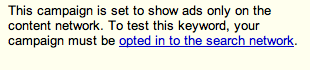
After digging further into my accounts, it appears Google Adwords will continue assigning Quality Scores to just Search Network only distibuted ads – not Content network ads – per this message:

Quality Score Content Network

Quality Score Content Network

Also appearing in my Adwords account for the first time are “Bid Below First Page” notifications:

Bid Below First Page

Bid Below First Page

Each “Bid Below First Page” notice is accompanied by Google’s recommended bid for achieving first page placement.

Now if only Adwords would provide Quality Score reporting options from their Report Center, large and small advertisers alike could begin to manage their Adwords account’s performance by its most important metric – the Quality Score.

Google Adwords Quality Score Updated

September 21, 2008

As promised on the Inside Adwords blog, Adwords accounts are now showing Quality Score data for each ad and its keyword.

I first noticed the Quality Score data across all of my active accounts yesterday.

Each ad and keyword’s Quality Score shows its status – whether the ads are showing or not as well as its numeric Quality Score.

I have found Adwords Quality scores ranging from 9 down through 2.

I am not sure whether Adwords assigns a Quality Score of 10 to any ads and keywords performance. Nor am I sure whether they score any ad and keyword below 2.

If Adwords does, I haven’t yet found any examples to share.

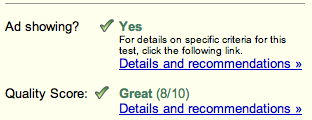
Within the new Adwords Quality scoring system, ads and keywords which score 9 and 8 are considered “Great”.

Adwords Quality Score 9

Adwords Quality Score 9

Adwords Quality Score 8

Adwords Quality Score 8

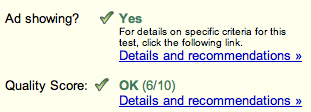
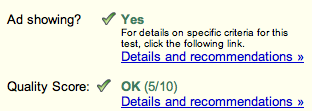
Ads and keywords showing 7, 6 and 5 are “OK”.

Quality Score 7

Quality Score 7

Quality Score 6

Quality Score 6

Quality Score 5

Quality Score 5

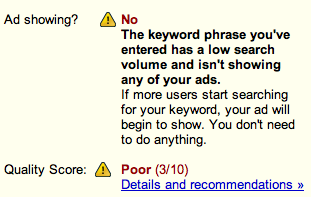
Ads and their keywords with Quality scores of 4, 3 and 2 are considered “Poor”.

Quality Score 4+No

Quality Score 4+No

Quality Score 3 No+Poor

Quality Score 3 No+Poor

Quality Score 2 No+Poor

Quality Score 2 No+Poor

I have found examples of OK Quality Scores where the ad and its keywords weren’t being shown for numerous reasons.

Additionally, I have found examples of ads and their keywords being shown while still having a Poor Quality Score.

Having numeric Adwords Quality Scores for each ad and keyword will surely help Google Adwords deliver more relevant and targeted advertising while also helping their advertisers score more targeted search traffic.

Adwords Campaign Statistics Summary Expanded

September 5, 2008

Google Adwords account campaign summary tab has been expanded to provide four viewing options:

All ( Search + Content )

All Search Content

Search

Adwords Search

Adwords Search

Content

Adwords Content

Adwords Content

Summary

Adwords Summary

Adwords Summary

This new level of data detail at the Adwords campaign summary level will help Adwords advertisers manage they are campaigns more effectively whether their targeting Google’s search network, the Google content network or both.

Medicare Marketing Strategies: Search Engine Optimization Webinar

May 8, 2008

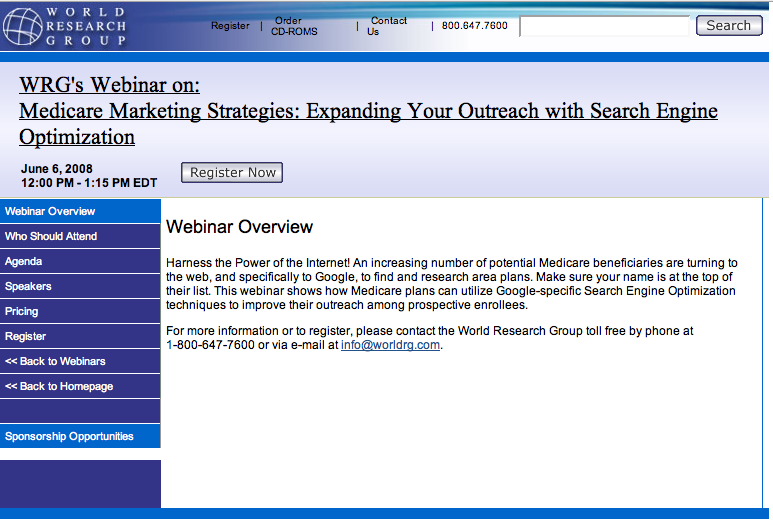
I am presenting a Webinar on Search Engine Optimization (SEO) to Medicare Marketing professionals July 10th, 2008 @ 12:00 PM – 1:15 PM EDT.

I recently presented at the World Research Group Medicare Marketing Strategies conference in Washington DC. I am looking forward to working with World Research Group again.

World Research Group

The Medicare Marketing Strategies Search Engine Optimization (SEO) Webinar Overview:

Harness the Power of the Internet! An increasing number of potential Medicare beneficiaries are turning to the web, and specifically to Google, to find and research area plans. Make sure your name is at the top of their list. This webinar shows how Medicare plans can utilize Google-specific Search Engine Optimization techniques to improve their outreach among prospective enrollees.

Who should attend the Medicare Marketing Strategies Search Engine Optimization (SEO) Webinar:

From Health Plans:

  • Chief Marketing Officers

Also Vice Presidents, Directors, and Managers of:

  • Marketing
  • Medicare
  • Senior Products
  • Senior Markets
  • Government Programs
  • Corporate Communications

Medicare Marketing Strategies Search Engine Optimization (SEO) Webinar Agenda:

Learn how to:

  • Target your prospects online instead of offline for measurable results
  • Transform your business into a modern marketing machine
  • Speak with your customers in their language, one they understand and prefer
  • Tap Google Adwords to reach prospects when and where they want to be reached.
  • Acquire new business more rapidly and efficiently through Google positioning.
  • Reduce friction and costs in your acquisition and retention program

About Tim Cohn:

World Research Group Speaker

For more information about the Search Engine Optimization Webinar or to register, please contact the World Research Group toll free by phone at 1-800-647-7600, via e-mail at info@worldrg.com or sign up for the Medicare Marketing Strategies Search Engine Optimization (SEO) Webinar at World Research Group.com

Medicare Marketing Strategies

March 11, 2008

I am presenting a workshop on marketing Medicare through Google for World Research Group on March 31st in Washington DC.

The 2nd Annual Conference on Medicare Marketing Strategies covers Medicare product development – customer acquisition and retention strategies.

My presentation for marketing Medicare: Utilizing Search Engine Optimization and Incorporating Strategic Web-Based Services to Increase Market Share will begin at 9:30 a.m. and end at 12:30 p.m.

The following is an overview of the workshop.

Google Your Medicare Marketing

The new age senior is far more advanced and tech-savvy. Seniors are looking for their Medicare information online through Google every day.

Nearly a million seniors visit Medicare.gov’s web-site each month, yet only come away with unwieldy lists of their area plans. More often than not, all these shoppers were really looking for was a local agent they could trust to answer their Medicare questions.

Learn how to be reached by potential Medicare enrollees. Learn how to acquire these types of Medicare buyers through Google at the restricted time in which they are searching who to buy from.

During this informative, interactive workshop you will learn how to:

• Gain a competitive market advantage by pre-empting your competition through Google
• Acquire new business more rapidly and efficiently
• Reduce your marketing costs for retention

More information on the 2nd Annual Medicare Marketing Strategies Conference and my Utilizing Search Engine Optimization and Incorporating Strategic Web-Based Services to Increase Market Share workshop can be found at World Research Group.

I am looking forward to presenting this workshop on Medicare marketing in Washington DC on March 31st.

Google Adwords Sponsored Links Displaying Google Local Business Center Maps

February 29, 2008

Google Adwords Sponsored Links Local Maps

Originally uploaded by TimCohn

For the last nine months Google has been testing the display of Google Maps information in their Local Google sponsored links results.

Today I discovered my own local Google Adwords ad displaying both information about my business from Google Maps and from my Google Local Business Center account.

However, the Google Maps and Google Local Business Center information still aren’t appearing in all Google search results.

Google Advertising Professional Video

February 6, 2008

As a Google Advertising Professional, I use the Google Adwords keyword suggestion tool daily.

Here is my Google Adwords video showing how to use  keyword suggestion tool and a link to the Google Adwords external keyword suggestion tool.

Google’s Local Advertising Embedded with Google Maps

January 29, 2008

As I mentioned in my last post, Google has begun taking additional steps to bridge the gap between web search traffic and their advertiser’s foot traffic.

In researching the different types of Local OneBox results found both here in the United States and abroad, I found an Adwords ad format I hadn’t yet seen – an Adwords Ad with a Google Maps icon embedded within the Google Adwords advertiser’s ad.

By adding Google Maps images to local advertisers ads, Google has simplified and reduced the searching online to visiting off line and in person to three steps.

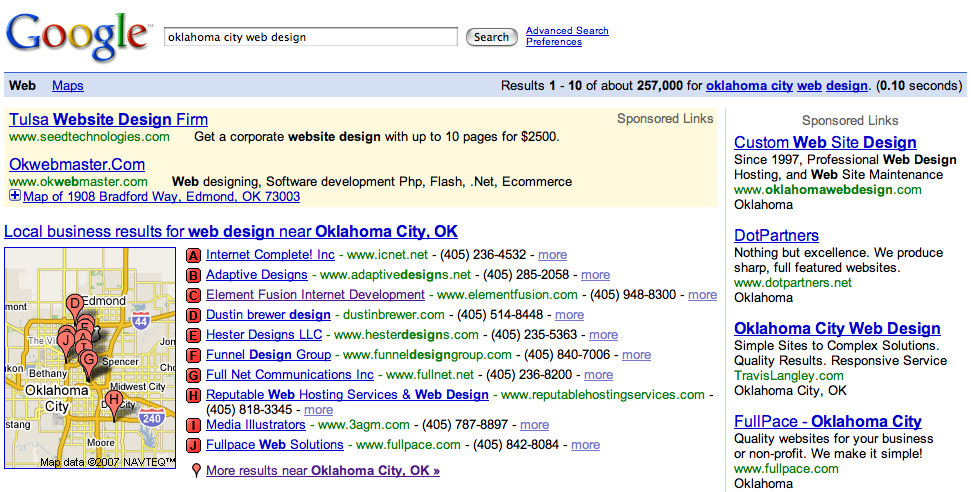
Step 1. The search for local products or services : Oklahoma City Web Design

The search for “Oklahoma City Web Design” produced the usual sponsored links both those above the new 10 OneBox results and those found along the right rail. However, after closer inspection I noticed the second listing had a maps icon embedded in the ad.

Google Local Adwords Ad + Google Maps

Step 2. Local product or service providers advertisement selected. Selection factors could include brands or services offered and their convenience to the searcher.

Google Local Adwords Ad + Google Maps Expansion

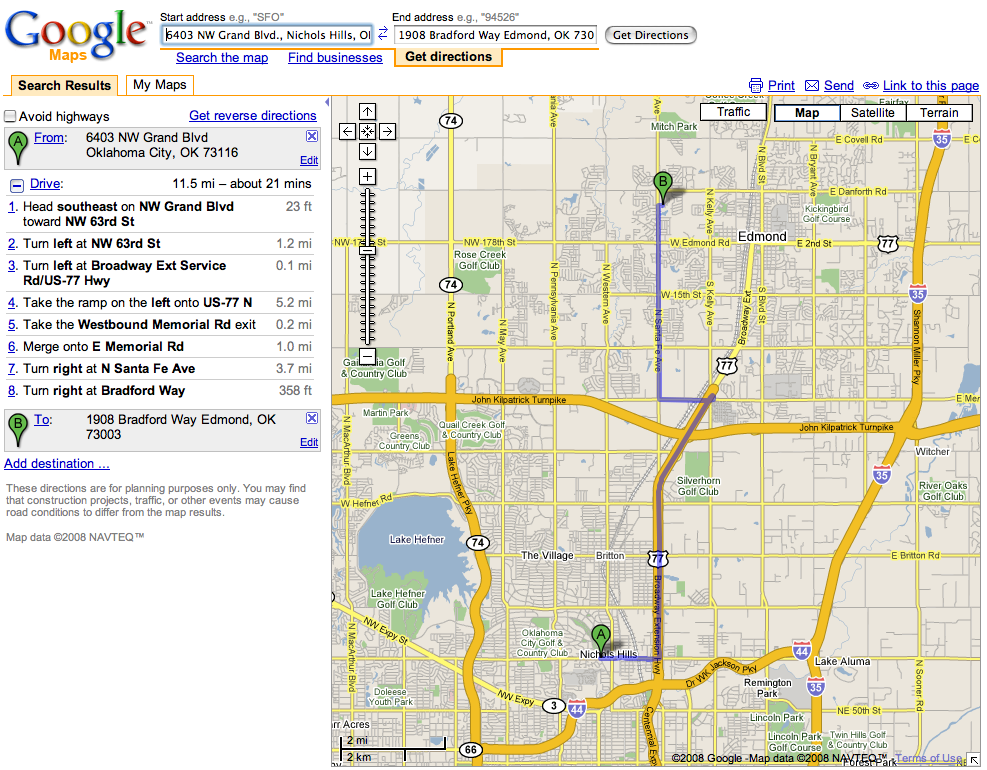
Step 3. After placing a call to the advertiser to verify their products availability and price, the searcher can then complete the three step process from searching online to buying off line by then getting directions to the advertisers location through Google Maps.

Google Local Adwords Ad + Google Maps Expansion + Directions

By adding the Google Maps feature to local Google Adwords advertisers ads, Google has bridged the gap between web search traffic and foot traffic in a fresh, unique and beneficial way.

Google Local Business Results and the Last Mile: Search Takes Two Steps Closer to Bridging the Gap Between Web and Foot Traffic

January 28, 2008

Google’s First Step…

As reported and since confirmed by Greg Sterling, Google is now showing up to 10 local business results for geographic specific queries.

Google told Greg the reason it’s showing more links is because usability testing revealed that many people didn’t realize there was additional local content available beyond the three listings, despite the “more results . . .” prompt. Accordingly, Google said that with the 10 links it is hoping to signal people that there is much more local content a click away.

Google also said that it wouldn’t always show 10 results; it might still show three sometimes or one if the query is very specific.

As Mike Blumenthal has noted, it has been nearly a year since Google last upgraded their Local OneBox. At the time it led to a significant increase in Google Maps usage.

It will be interesting to see if and how Google’s worldwide roll out of their new Local OneBox increases Google Maps usage like it did after implementing their last Local Business OneBox changes.

In my previous post about Google’s local business results being expanded, I wrote about how the listings appeared locally and some of the factors I thought contributed to the listings.

Sterling reported the ten results are based on a range of factors, including the “query, proximity, availability of ratings/reviews and their quality and several other variables.”

Since Google doesn’t publish exactly what factors influence their list, all we can do is study what they publish and draw our own conclusions as to which variables may matter the most.

The following are examples of searches I have ran, Google’s Local OneBox business results and my analysis of what variables I think generated the list.

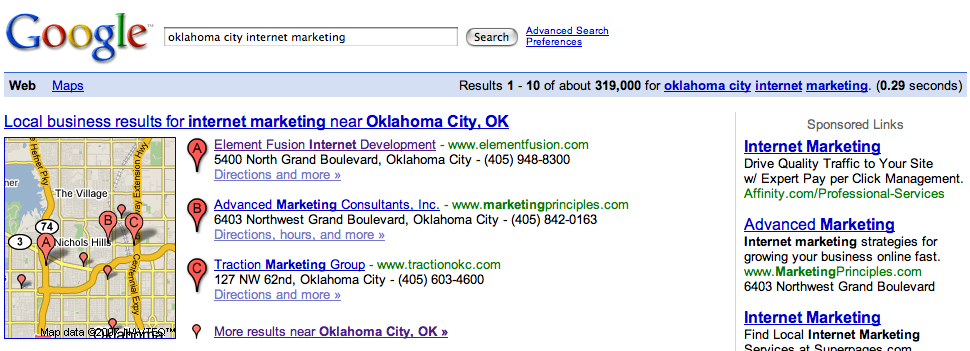
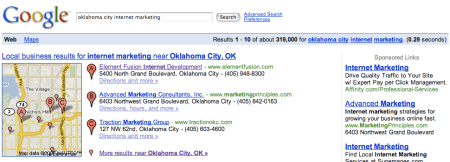
Google Local Business Results: Internet Marketing Oklahoma City –

Google Local Internet Marketing Oklahoma City

This query for a service (internet marketing) followed by the location (Oklahoma City) produced a “top of page” 10 listings OneBox result. I also found some Google Adwords ads displaying the recently discovered business address on the fourth line of the Adwords ad.

Google Local Business Results: Oklahoma City Internet Marketing –
Google Local Oklahoma City Internet Marketing

Searching for the same terms in a different order; placing the location first (Oklahoma City) and the service (internet marketing) last, produced a OneBox result with only three business listings. Some local Adwords advertisements still appeared with their specific address on the fourth line, which as mentioned previously only displayed a city or state.

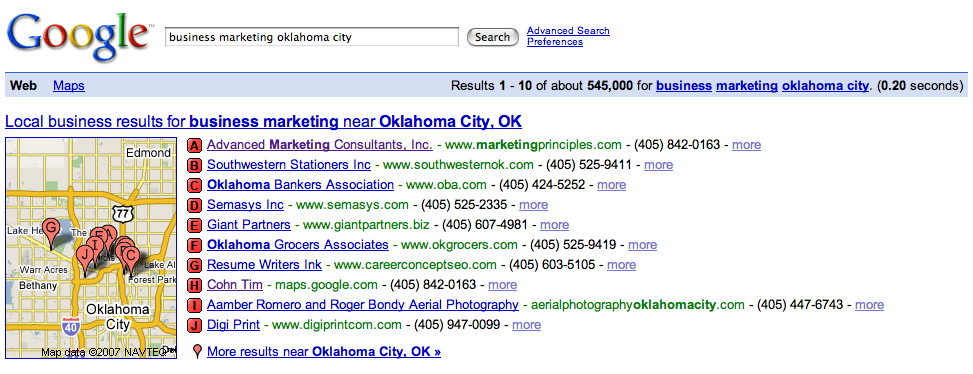
Google Local Business Results: Business Marketing Oklahoma City –

Google Local Business Marketing Oklahoma City

A slightly different search for a similar business category yields a new clue to at least one of the factors Google uses to generate its OneBox 10 local business listings.

A search for the service (business marketing) and the location (Oklahoma City) produces a different yet seemingly innocuous list of businesses. However, in this particular query and in addition to the expected listing for my business “Advanced Marketing Consultants” appearing, “Cohn, Tim” also appears as one of the results.

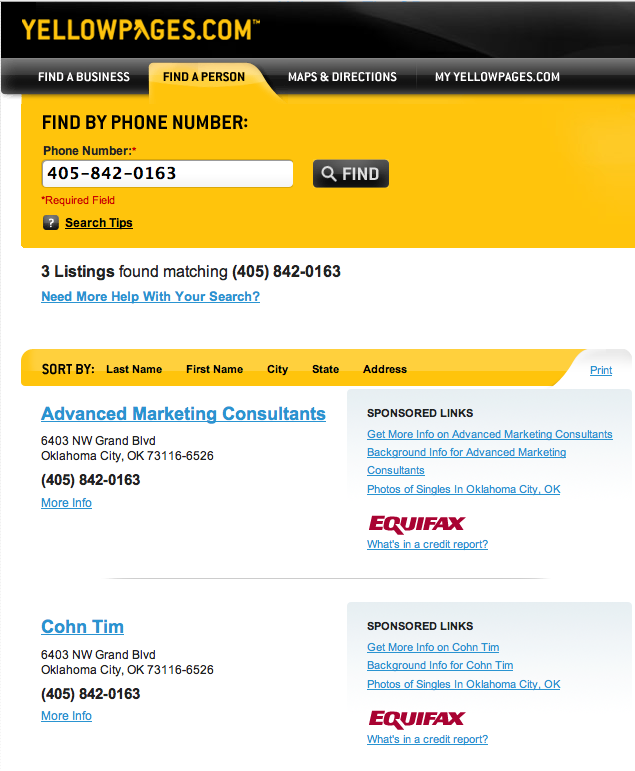
Cohn, Tim is one of my business phone listings in my local Bell telephone directory. The phone company apparently can’t sort and digitally publish business listings with an individual’s name like they can an individual’s residential phone data.

A search in YellowPages.com produces “Cohn, Tim” for my business phone number –

YellowPages.com

Yet, a search in Google for “Tim Cohn Oklahoma” produces both of my residential phone numbers and listings in correct order: Tim (first name) and then Cohn (last name) –

Tim Cohn Oklahoma

I haven’t investigated whether the phone company automatically reverses residential phone records before they are published to the web or whether Google reverses the data before they publish it.

Regardless, it looks like the business listing for “Tim Cohn” will remain forever memorialized in the vast telephone company data and its Internet counterpart as the business listing: “Cohn, Tim”.

Having accepted the fact that the telephone company seemed incapable of changing their listing results years ago, I decided to turn this particular piece of flawed data into my “control”.

When Cohn, Tim appears in print – whether online or off – its source is always local phone company data.

Thus at least a portion of this particular Google local OneBox list origins lies in business telephone directory data.

To its credit, Google has become proactive in allowing users to modify incorrect Google data as Barry Schwartz recently reported.

And unlike my attempts to get the phone company to correct how my business phone listing appears both in print and online, I am sure Google will let me append my business listing in their Google Local Business Center, but that will have to be the subject of another post.

Google Local Business Results: Chevy Oklahoma City –

Google Local Chevy Oklahoma City

Unlike with an old fashioned yellow pages search for listings with “Chevy Oklahoma City” keywords whether in the yellow pages or through directory assistance, Google can return results most likely relevant and matched to the searchers or callers intent.

Whereas, a yellow pages search or directory assistance call would take a couple of “passes” to yield the similarly accurate and desired result – businesses listings most likely to be known as “Chevy Oklahoma City”.

Brilliant!

If the telephone company can’t arrange and organize my single business listing correctly in their digital directories, how will they ever be able to compete with Google’s ability to anticipate and even provide multiple possible answers to each searchers question?

Google Local Business Results: Double Glazers Chelsea London (England) –

Google Local London

Google’s local business results aren’t just appearing in the US. A search for “double glazers” in the Chelsea section of London produces a list of double glazers midway down the search engine results page. I am not sure why some OneBox results appear at the top of the page and why others appear in the middle of the page but I believe it too must be based on Google’s understanding of the searchers intent.

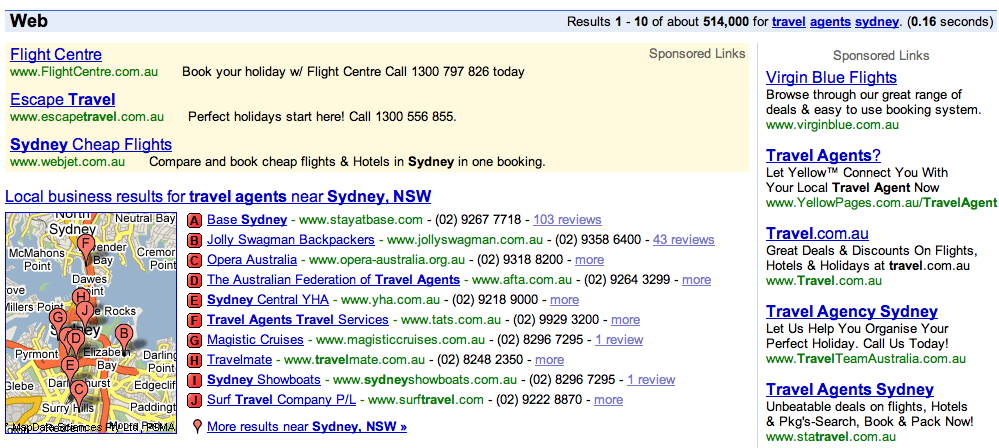
Google Local Business Results: Travel Agents Sydney (Australia) –

Google Local Sydney

This search in Sydney, Australia for travel agents also produces a OneBox result. Here the OneBox appears again at the top of the page above the organic results.

In my next post, I will show how Google’s local business results have taken a second step closer to bridging the gap between paid web search traffic and foot traffic…