Archive for the ‘Google Adwords’ Category

Where to Vote on November 4th? Find Your Local Polling Place with Google Maps

October 24, 2008

Today when I was logging into my Google Adwords account, I received the first non Google message I can ever remember receiving in My Client Center: “Vote On November 4th.”

Accompanying the reminder to vote message were two links: one to Google’s 2008 Voter Info Map and the other to: Find your local polling place.

Vote on November 4th

Vote on November 4th

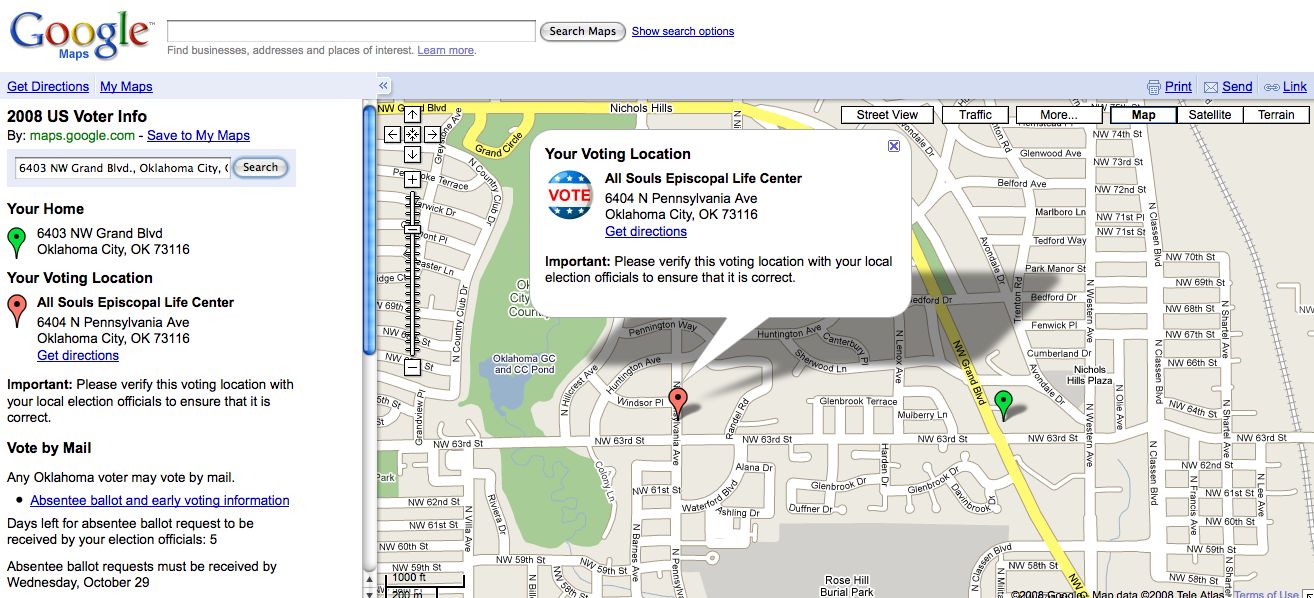
The first link took me to Google Maps and their 2008 US Voter Information search box. Here visitors can  find their neighborhood voting location by entering their home address.

According to Google, their local polling place Maps were developed with help from state and local election officials and the Voting Information Project in conjunction with the League of Women Voters.

Where To Vote

Where To Vote

I entered my address and sure enough I received the correct location for where to vote within my local precinct.

Locate Polling Place

Locate Polling Place

Google Maps suggests searchers who have looked for and found their local polling place in Google Maps verify their voting location with local election officials to ensure that it is correct.

Google Maps also provides a link to absentee ballot and early voting information for how to “Vote by Mail” as well as how much time is left for voting by mail within a particular state.

Google’s 2008 Voter information Map is a great starting point for any voter who is looking for more information about where to cast their votes in the 2008 Presidential Election on November 4th, 2008.

Google Adwords Quality Score Available in Reports

October 22, 2008

In a previous post, I requested Adwords provide Quality Score reporting options from within Adword reports.

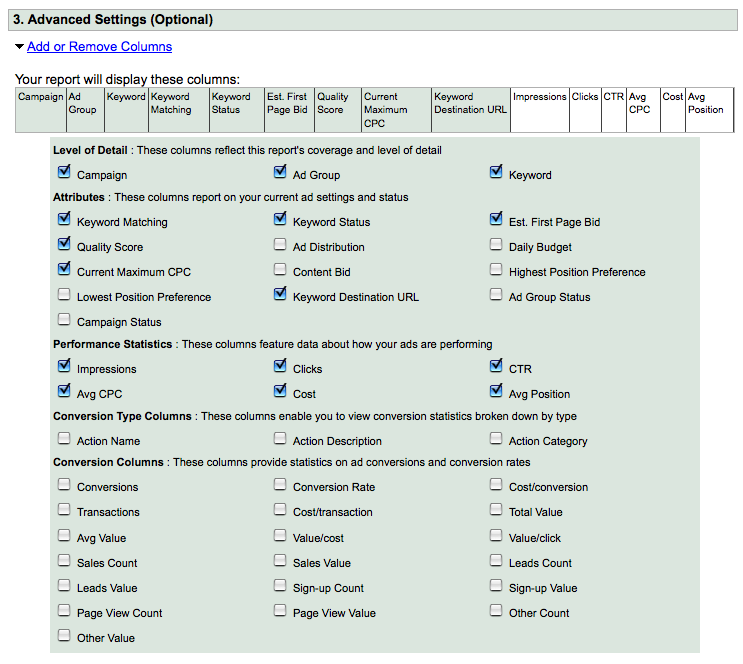
Quality Score data are now available from Google Adwords reports.

Google Adwords Quality Score Reporting

Google Adwords Quality Score Reporting

By providing Quality Score report data to their advertisers, Google Adwords has taken the first step toward making Adwords Quality Score Management a reality.

Thanks Google Adwords!

Adwords Translation Services

October 19, 2008

I get emails regularly from a variety of different web specialists who are looking for additional work.

Today I received the following email:

“I worked for Google as a QA Tester Adwords and Adsense, all in Spanish language at their headquarters in Mountain View.

I am looking for a position that will utilize my knowledge in Google products (Adwords / Adsense) as well as in Spanish. I also speak Hebrew and Arabic. I tested Adwords in BIDI languages (Bi-directions language – right to left).

I would like to work with you educating people on the power of Adwords, specifically the Spanish speaking population.”

Although I don’t have a need for translation of my Adwords campaigns into Spanish, Hebrew or Arabic – if you are looking for Adwords translation services, send me an email and I will put you in touch with an Adwords specialist who can translate your campaigns into Spanish, Hebrew and Arabic.

More Adwords Campaign Data Summary Display Options

October 16, 2008

Adwords is now offering seven different levels of campaign summary data at the Adwords campaign level.

The seven options are:

1. Summary: The Adwords campaign summary combines all data into a single top line of data.

Adwords Campaign Summary

Adwords Campaign Summary

2. Split – all search/content network: Search networks are combined and displayed along with content network results.

Adwords Split All Search Content Network

Adwords Split All Search Content Network

3. Split – Google search, search partners and content network: All three types of Adwords search distribution are delineated and displayed – Google search, search network partners and content network.

Adwords Split Google Search Search Partners Content Network

Adwords Split Google Search Search Partners Content Network

4. Only Show  – Google search / search partners: Adwords combines Google search and search partners’ results ( if in fact search partners distribution has been enabled ) into a single total.

Adwords Google Search Search Partners

Adwords Google Search Search Partners

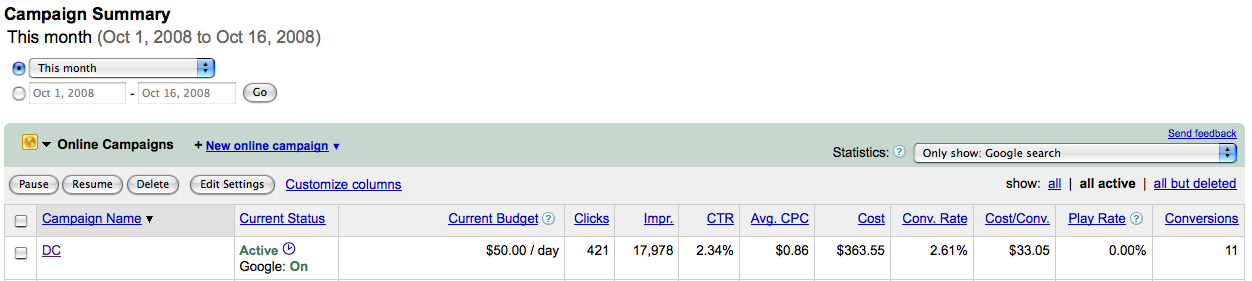
5. Only Show – Google search: Adwords campaign results data for only the Google search portion of a campaign.

Only Show Google Search

Only Show Google Search

6. Only Show – Search Partners; Adwords campaign results for search partners only – again if your campaigns have been enabled to distribute ads via Google search partners.

Only Show Search Partners

Only Show Search Partners

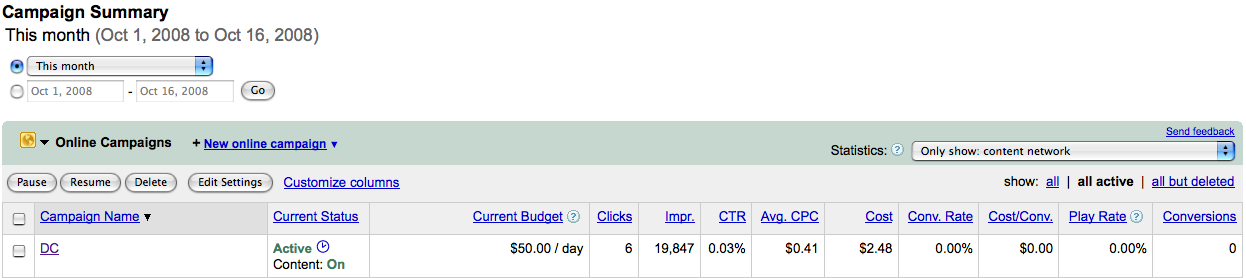
7. Only Show – Content Network: campaign results from Google Adwords content network distribution.

Only Show Content Network

Only Show Content Network

By providing these additional levels of data at the campaign level, Google Adwords has made scanning and interpreting Adwords campaign distribution results quicker and easier.

Targeting iPhone Users with Google Adwords

October 9, 2008

Adweek reports Google has had discussions with ad agencies regarding advertisers targeting their ads to iPhone users specifically via Google Adwords.

While in Utah yesterday, my fly fishing guide Justin Harding and I noticed when using Google search from his iPhone Google Adwords advertising was sparse.

Initially, I thought it was because of the type of search we had ran.

However, after further investigative searches under highly competitive and advertised keywords, we weren’t ever able to see Adwords sponsored links on the right rail – only above the first search result.

Can a iPhone Google search display more than two Adwords advertisers ads as is now?

We weren’t able to generate any.

How is Google parsing iPhone search ads results for display? If they are, is Google distributing advertising to the iPhone with the same formula they use for displaying search results elsewhere?

Are iPhone screen real estate limitations the reason why we could only get two ads?

Even when we rotated the search results screen for horizontal viewing – under a Google search term that would typically have had up to ten sponsored links ( both above the search results and running down the right rail ) we were only able to generate two Adwords advertisers ads.

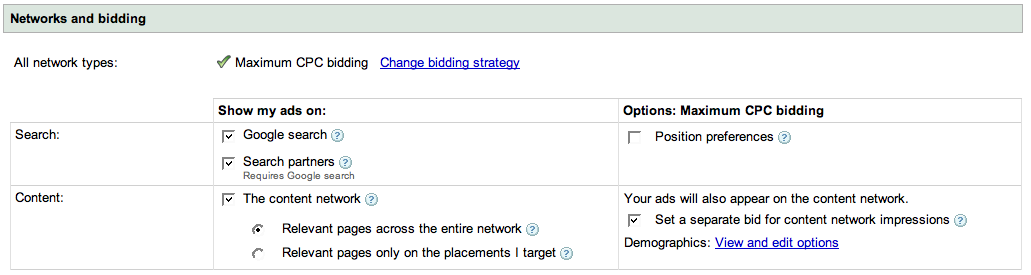
Will Google Adwords advertisers soon be able to select “iPhone” as a search distribution option along with “Google Search” and “Search Partners” within their campaigns Networks and bidding settings?

With 10 million iPhones in use and Apple’s iPhone supplying Google with its largest source of mobile search traffic, adding iPhone distribution to Google advertising campaigns will give Google Adwords advertisers another way to target and reach an increasingly mobile search audience.

Google Network Options

Google Network Options

Search Advertising Geo Targeting Options

October 3, 2008

If targeting local and mobile search advertising is the future growth drivers for search advertising providers, then Google and its Adwords geo-targeting features are in the driver’s seat when compared to its three closest search advertising rivals Yahoo, Microsoft and Ask.com.

Below I outline each providers’ offerings not according to their search advertising market share but instead according to their level of geotargeted advertising product development.

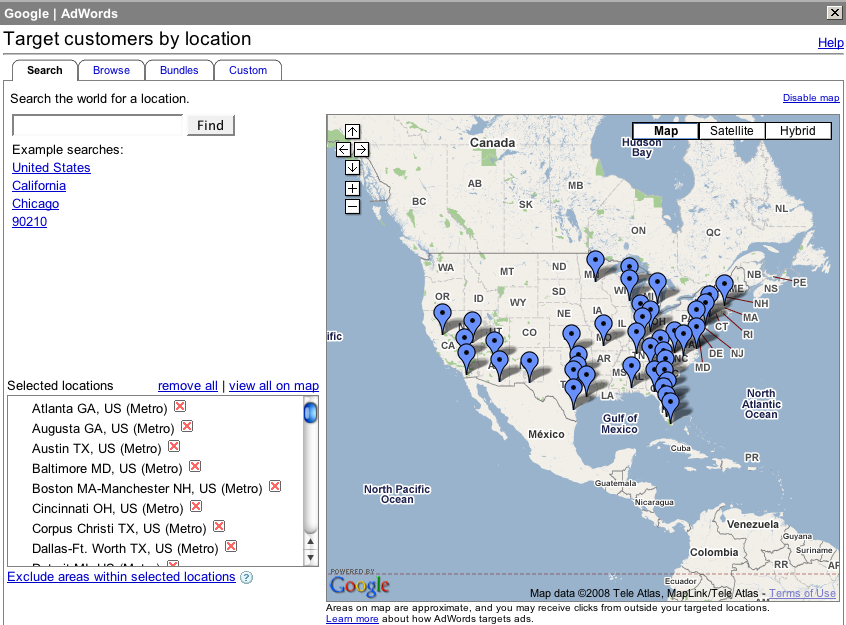
Google’s advertising product and its geo-targeting capabilities have one distinct yet obvious feature the other’s lack:

An actual map for geo-targeting the location of your ads and where they will be shown!
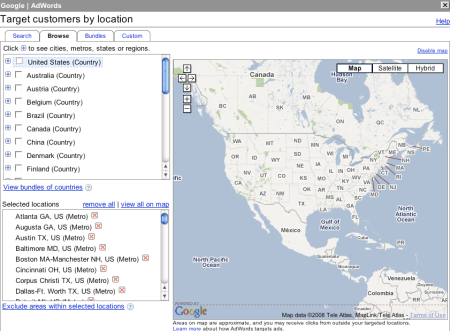
Google Search Advertising Country Geotargeting

Google Search Advertising Country Geotargeting

With Google Adwords, advertisers can target their ads one country at a time through Google’s Country Geotargeting tab, or choose to bundle their ads for display in multiple countries at once with Adwords Bundle Geotargeting feature.

Google Search Advertising Bundle Geotargeting

Google Search Advertising Bundle Geotargeting

Google Search Advertising Bundle Geotargeting

Google Search Advertising Metro Geotargeting

Google Search Advertising Metro Geotargeting

Google Adwords advertisers who advertise in specific markets nationally or regionally can target their ads by metropolitan area or by city.

Although not referenced, Google’s metropolitan area targeting looks slightly similar to the Designated Market Area system developed by Nielsen Media Research which incorporates Nielsen’s broadcast media markets and distribution scheme.

For its City geotargeting option, Google surrounds the target city with a square.
Google Search Advertising Custom Geotargeting

Google Search Advertising Custom Geotargeting

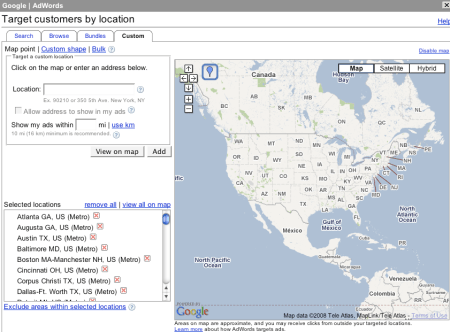
Google custom geotargeting by far provides the highest level of geotargeting available from any search advertising provider.

Custom geotargeting lets advertisers create their own custom advertising distribution area within any market.

Google search advertisers can simply point and click three or more points on their advertising map and Google does the rest for them – creating a custom advertising distribution area through latitude and longitude coordinates.

How do the other search advertising providers’ geo-targeting features stack up compared with Google’s?

Yahoo and Ask both offer advertising geo-targeting options but both to a lesser degree.

Yahoo Search Advertising Geotargeting

Yahoo Search Advertising Geotargeting

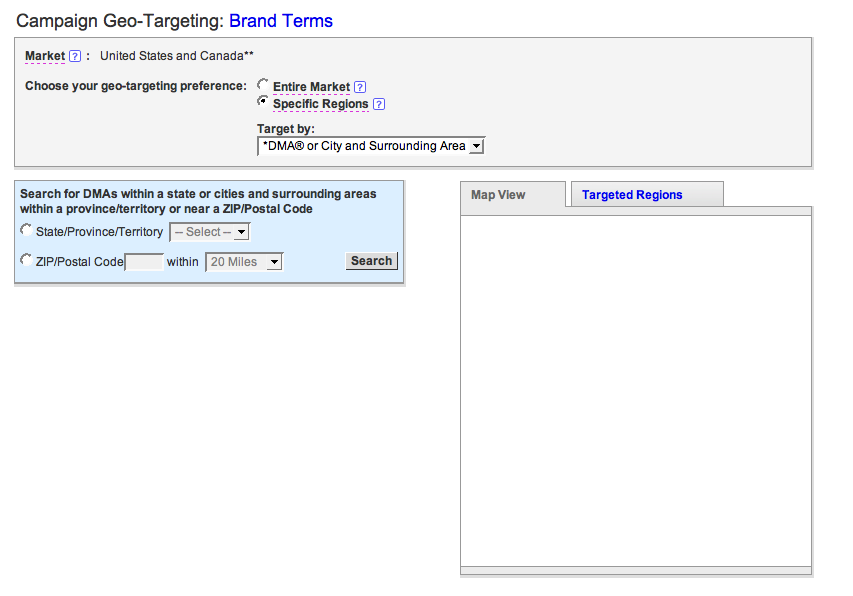
Yahoo offers geotargeting to it advertisers by account market area and specific regions. Account market area is established by the advertising account holder when the open their account. Both account market area and specific region areas are organized by country, state, province or territory.

The Yahoo specific region feature geotargets its advertising through the Designated Market Areas system licensed from Nielsen Media Research.

Yahoo Search Advertising Geotargeting Mapview

Yahoo Search Advertising Geotargeting Mapview

Where is the Yahoo Search Advertising Geotargeting Map?

Yahoo offers a Map View tab of specific regions geotargeted by its advertisers yet I haven’t ever been able to view an actual Yahoo map showing where my advertising has been geo-targeted and placed.

I can’t imagine why Yahoo search marketing would place a “Map View” tab in their Campaign settings geo-targeting page yet not actually provide a map view.
Ask Search Advertising Geotargeting

Ask Search Advertising Geotargeting

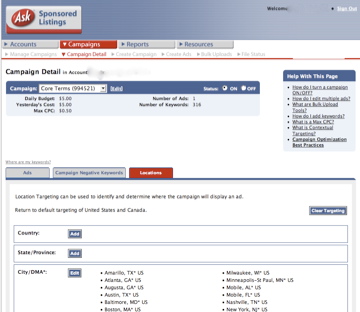
Ask provides its advertisers with Location targeting which is also based on Nielsen’s Designated Market Area system.

Ask doesn’t provide a map showing advertisers locations of their geo-targeted advertising.

However, and to its credit – Ask does provide a geotargeting feature direct marketers like myself would like to see from other search advertising providers like Google Adwords – Postal Code targeting.

Postal Code Targeting or Zip Code targeting here in the US would allow direct marketers and brands alike another level of advertising targeting, delivery and thus control.
At this point you may be wondering why I chose to cover Microsoft’s adCenter search advertising geotargeting product last even though it has a larger share of the search market than Ask.

Why have I listed Microsoft’s advertising geotargeting product development last?

Because Microsoft’s search advertising product does not offer its advertisers geotargeting options let alone any other kind of geographic ad targeting.

Microsoft Search Advertising Geotargeting

Microsoft Search Advertising Geotargeting

Will Microsoft ever offer advertising geo-targeting features to its advertisers?

If not, why?

Google Adwords Presentation: Jon M. Huntsman School of Business

October 2, 2008

I am giving a presentation on Google Adwords Oct 08-09, 2008 in Logan, Utah at Utah State University’s 18th Annual Customer Service & Marketing Seminar.

Customer Service Marketing Seminar

Customer Service Marketing Seminar

Utah State University’s Customer Service and Marketing Seminar is organized and produced by the University’s Partners in Business program at the Jon M. Huntsman School of Business.

I would like to thank Cameron Oliver for extending me an invitation to speak at his group’s event.

Partners In Business

Partners In Business

I accepted Cameron’s invitation to speak about Google Adwords in the Utah market for several reasons.

The determining factor which ultimately lead to my decision to agree to speak to a Utah audience about Google Adwords was of course – data from Google itself.

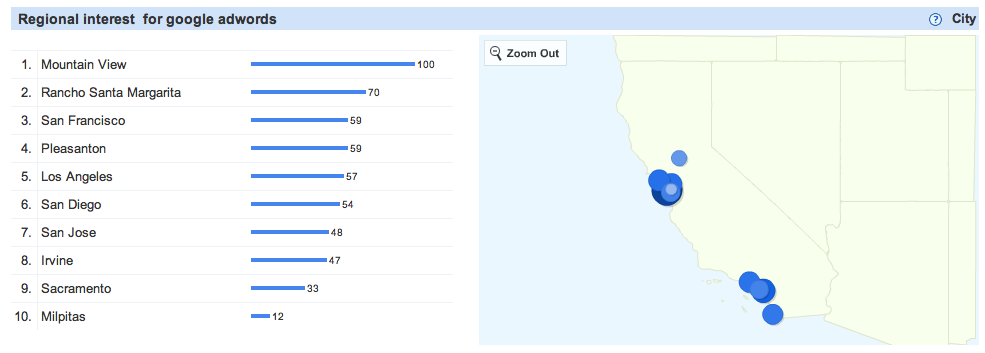
According to Google’s Search Volume Index, information about Google Adwords is sought by more searchers from Utah than from any US state other than Google’s home state of California.

Google Adwords Regional Interest

Google Adwords Regional Interest

As you can see, California scores a 100 in Google’s Search Volume Index for Google Adwords followed closely by Utah’s 93.

Google’s Search Volume Index tool also confirms search interest in the Google brand is highest in Mountain View, CA where Google has its headquarters.

Google Adwords California Search

Google Adwords California Search

Google’s Search Volume Index is an excellent tool for visualizing whether any market demand exists in any particular region of the world for products and services – or not.

Google data says people in Utah are interested in Google Adwords – so Utah – here I come!

I will be speaking twice at the Customer Service and Marketing Seminar on October 8th first at 9:45 and then again @ 2:30.

Customer Service Marketing Seminar Schedule

Customer Service Marketing Seminar Schedule

The title of my 50 minute presentation is: Google Your Business and Marketing!

Below is an overview of my presentation and the topics I plan to cover.

Overview:

Harness the power of Google to grow your business!

An increasing number of buyers are first turning to Google to research products and services before they purchase.

Make sure your business comes up in Google when searchers are deciding where and who they should buy from.

This presentation will show both small and medium size businesses how they can implement Google-specific search engine marketing and optimization techniques to get more buyers, larger sales more often.

Learn how to:

Target your prospects online instead of off-line for measurable results.

Transform your business into a modern marketing machine.

Speak with your customers in their language, the language they understand and prefer.

Tap Google Adwords to reach your prospects when and where they want to be reached.

Acquire new business more rapidly and efficiently through marketing on Google.

Reduce your customer acquisition and retention cost.

I am looking forward to speaking about Google Adwords and presenting “Google Your Business and Marketing” at Utah State University’s 18th Annual Customer Service & Marketing Seminar.

Conversion Code Verification Process

September 27, 2008

Google provides “conversion code” to Adwords advertisers for tracking actions occurring after searchers have clicked on advertisers ads.

Five action types Adwords advertisers can track are:

1. “Other”

2. Purchase/Sale

3. Signup

4. Lead

5. View of a key page

5 Action Types

5 Action Types

Once the conversion code has been installed into the source code between the <body> and </body> tags of your action page, the advertiser needs to verify whether Google Adwords can track the conversion code correctly or not.

Google can track conversions on both secure and non secure sites.

Until recently, I hadn’t had any problems verifying or tracking actions from either type of site.

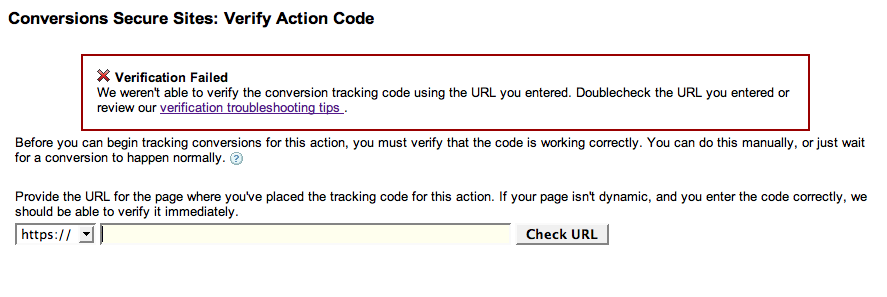
However, while trying to verify action code from dynamic pages within a secure site, I wasn’t able to generate a result other than “verification failed” when using Adwords test “verify action code” feature.

Conversion Code Verification Failure

Conversion Code Verification Failure

Conversion Code Verification Failure – sans url.

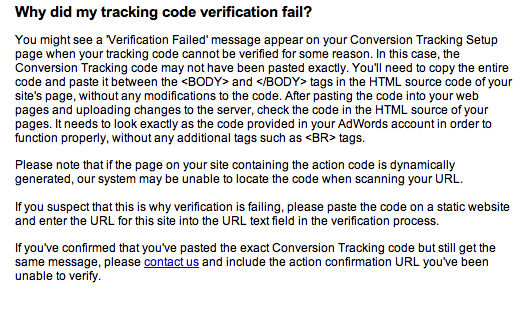
Tracking Code Explanation

Tracking Code Explanation

When verifying whether or not an action code is reporting correctly from a dynamic and secure site and provided the code has been installed correctly, advertisers may find clicking on one of their ads and then completing the action may provide the quickest and easiest answer to their question – “is the conversion code working or not?”

Otherwise, launching a campaign without verification and waiting for a conversion action to eventually occur may be the only other way to determine whether the conversion code actually reports or not.

Google Adwords Reports and Quality Score Management

September 25, 2008

With Google having added numeric quality scores ranging from 1 to 10 within all Adwords advertisers accounts, an entirely new level of performance data has become available to paid search managers.

Will Google Adwords Quality Score Management soon follow?

Presently, Adwords provides advertisers with ten different types of account performance reports.

The ten types of Google Adwords reports along with their attributes are:

1. Keyword Performance: Performance data for all keywords or those in selected campaigns.

2. Ad Performance: Performance data for each of your ads

3. URL Performance: Performance data for each of your Destination URLs.

4. Ad Group Performance: Ad group performance data for one or more of your campaigns.

5. Campaign Performance: Performance data for your campaigns.

6. Account Performance: Performance data for your entire account.

7. Demographic Performance: Performance data for sites by demographic.

8. Geographic Performance: Performance data by geographic origin.

9. Search Query Performance: Performance data for search queries which triggered your ad and received clicks.

10. Placement Performance: Performance data for placements where your ad was placed.

Adwords Quality Score Report Type

Adwords Quality Score Report Type

These ten types of Google Adwords reports provide valuable and actionable Adwords account performance data paid search managers require for making informed adverting purchasing decisions.

Reports are available in daily, weekly and monthly intervals.

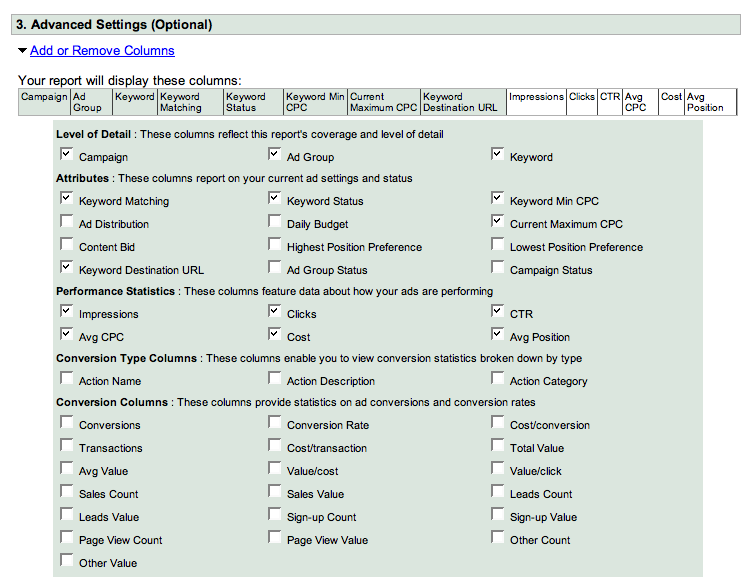
With the Adwords reports advanced settings option, advertisers can receive an even greater degree of account performance details.

Additional attributes available from the advanced settings reports include performance statistics, conversion types and detailed conversion data.

Adwords Quality Score Advanced Settings

Adwords Quality Score Advanced Settings

With the advent of their Adwords numeric quality score, Google has now denominated the level of advertising performance it requires from advertisers.

Additionally, Google has given their advertisers a new tool for further identifying, managing and improving ad and keyword performance.

In exchange for their new advertising quality measurement tool, Google will ultimately get improved advertising quality.

As far as I know, the numeric quality score is the first metric Google has made public to either its publisher or advertiser community that can be measured against and thus managed to.

The numeric quality score is yet another milestone on Google’s road to further transparency with its advertisers.

At some point, will Google provide Adwords Quality Score reporting options to its advertisers too?

By providing advertisers with Quality Score reporting, advertisers will then have an another set of important data for further managing and improving the performance of their ads and keywords.

By making Quality Scores available in Adwords reports, Google would initialize the Adwords Quality Score Management process.