Archive for October, 2009

A Small Market Perspective

October 11, 2009

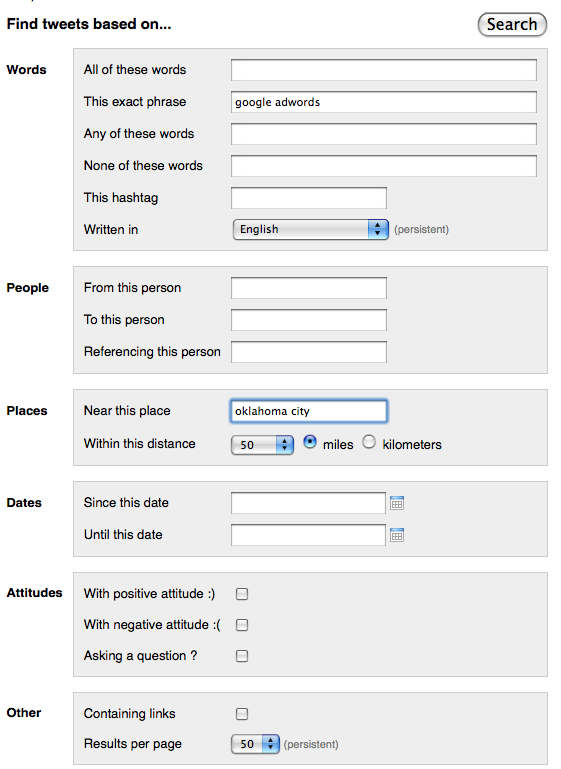
Twitter’s advanced search features can be used to locate Tweets coming from Twitter accounts within a specific mile radius of a city or state.

Twitter Advanced Search

Twitter Advanced Search

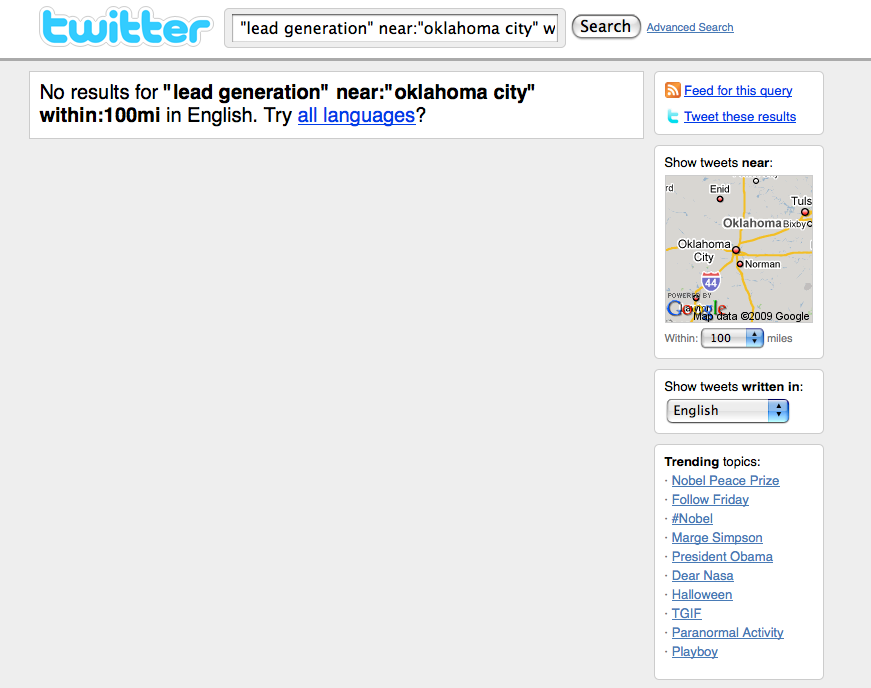
As you can see from the results below, I still haven’t figured out how to use Twitter’s real time search to help generate prospects, leads or sales efficiently.

Real Time Search Google Adwords

Real Time Search Google Adwords

Has anyone?

Real Time Search Lead Generation

Real Time Search Lead Generation

Maybe Twitter hasn’t figured out how to make money from their service because Twitter account holders haven’t yet figured out how to make money on Twitter either.  ( Of course this excludes the Twitterers selling “How to make money on Twitter” books and tapes…

Google Webinar: Using Data To Better Connect With Your Customers

October 10, 2009

Google Analytics Evangelist Avinash Kaushik recently hosted a one and a half hour long webinar called “Using Better Data to Connect with Your Customers.”

Although I wasn’t able to attend the original webinar, watching this video at a time that was convenient for me was the next best thing to being there.

I look forward to seeing more webinars like this one on the Google Business Channel @ YouTube.

YouTube Insight Statistics and Data

October 9, 2009

I hadn’t logged into my YouTube account since I ran a Sponsored Videos advertising test several months ago.

Today when I logged into my account,  I was surprised to see the new level of data available on my YouTube homepage.

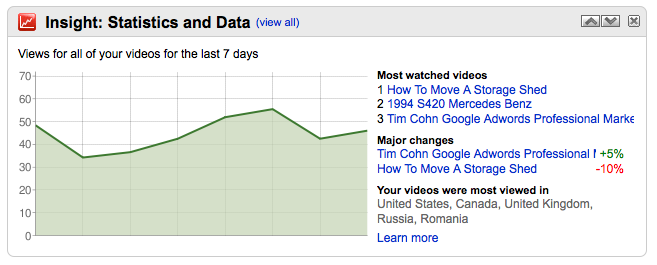
Upon logging into a YouTube account, users are now given an account snapshot via two Insight Statistics and Data graphics.

The first graphic shows how popular an account’s videos were relative to those of other uploaders over the last seven days, major changes, where videos were most popular and total views.

YouTube Insight Statistics and Data Locations

YouTube Insight Statistics and Data Locations

The second graphic shows the total number of views that occurred in a YouTube account over the last seven days.

This screen’s data includes the account’s most watched videos, the major changes within an account and which countries where videos were viewed the most.

YouTube Insight Statistics and Data Views

YouTube Insight Statistics and Data Views

Providing these two account snapshots upon log in helps YouTube account holders quickly grasp how well the videos within their account have been performing.

My First WordPress Blog Tweet to Twitter

October 8, 2009

WordPress.com has announced a new feature called Publicize which let WordPress publishers tweet their blog posts directly to their Twitter account.

The feature is enabled from WordPress Dashboard’s → My Blogs admin page.

Enable WordPress.com Account To Tweet

Enable WordPress.com Account To Tweet

Once enabled, WordPress users are directed through an authorization procedure to confirm that they want to connect their WordPress.com blog and their Twitter account.

Wordpress Twitter Authorization

Wordpress Twitter Authorization

After Twitter allows access to a WordPress blog, the blogger’s account will display a message showing a successful connection has been made.

Successful WordPress.com Connection to Twitter

Successful WordPress.com Connection to Twitter

I assume publishing a WordPress blog post then automatically Tweets the post and it’s WordPress shortened url (Wp.Me) to the previously selected Twitter account.

How To Report A Problem With Google Maps

October 7, 2009

The Google Earth and Maps team have created a new base map dataset that allows Google Maps users to “report a problem” among other new features.

From the Google Lat Long Blog:

“We’ve added a new tool to Google Maps that lets you communicate directly with Google about any updates that you think need to be made to our maps. You’ll find this “Report a Problem” link on the bottom right of Google Maps (you can also find it by right-clicking on the map). Has that new highway on-ramp finally opened up? Do we have an outdated name for your local school? Was Main Street converted into a pedestrian-only walkway? Tell us! Once we’ve received your edit or suggestion we’ll confirm it with other users, data sources, or imagery. We hope to resolve each edit within a month. If you submit your email address, we’ll even keep you posted on our progress.

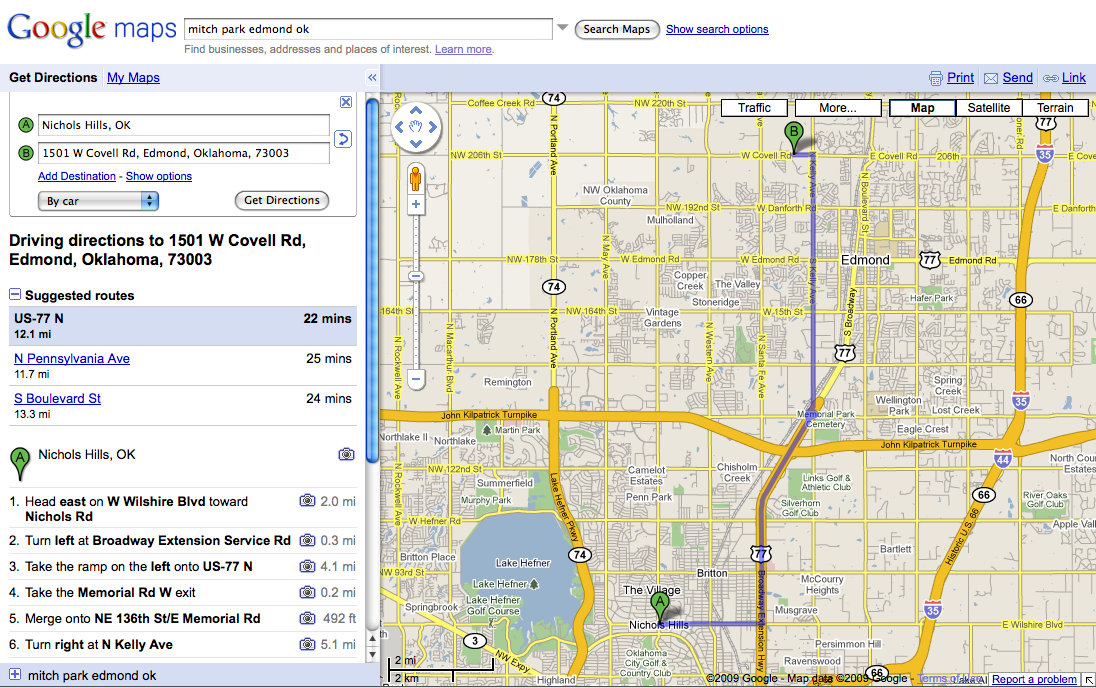
Just yesterday, I had a problem generating driving directions with Google Maps where a local athletic park had the correct address but an incorrect Zip Code.

Even though Google Maps had the correct street address, the incorrect Zip Code overrode Google Maps ability to generate a correct point A to point B driving route.

In the example below, you can see the business (Mitch Park) address shows a ZIp Code of 73034.

Correct Address Incorrect Zip Code

Correct Address Incorrect Zip Code

Since I didn’t know beforehand this was the incorrect Zip Code for the park,  when I attempted to generate driving directions yesterday Google Maps “assumed” my directions were to 1501 East Covell because a East Covell street address coincided with the Zip Code data (and still does) they had for the park.

Mitch Park 73034

Mitch Park 73034

Today after editing the listing’ push pin to display the correct address on West Covell,  Google Maps has begun to offer two alternative destinations and routes – one to the East Covell (73034 incorrect Zip Code) location and one to the West Covell address ( the 73003 corrected push pin location).

Mitch Park 73003

Mitch Park 73003

Selecting the corrected Zip Code address link on West Covell then produced correct driving instructions to the corrected Park location.

Correct Google Maps Driving Directions

Correct Google Maps Driving Directions

Overall, the speed with which these corrections took place in both correcting the park’s location vis-a-vis its Zip Code and then the subsequent alternative destination driving directions – were quite impressive.

Combined with their new base map dataset and users ability to report problems, the Google Earth and Maps team should be able to deliver a more accurate and up to date Google Maps user experience.

Google Local Business Center Testing Local Listing Ads

October 6, 2009

Greg Sterling reports on his blog and at Search Engine Land about Google’s announcing their new local advertising product called Local Listing Ads.

Google Local Listing Ads

Google Local Listing Ads

More about the features of Local Listings ads from Google’s Local Business Center:

Drive more sales
Over 80% of people look to Google for local information. Make sure your listing stands out.

See – and hear – the results
You’ll hear “this call brought to you by Google” with every call from your ad.

Free for 30 days
Try it out, risk free. You can cancel anytime.

Local targeting
We’ll make sure your ad only shows to people near your business, with no work for you.

Local Listing Ads are currently available only in San Francisco and San Diego, CA.

From a Google and Small Business Marketer’s perspective, I have to wonder what kind of resources – both human and financial – Google is putting into this new program to make it a success?

Who is running the Local Listings program within Google – a Google Maps or Google Adwords team, the “Local Business Center” team, a new team or a not yet formed team?

I think Google’s answer to this question lies the fate of the Google Local Listings advertising program.

Software Engineer SEO Amazon.com

October 5, 2009

I thought this job opening for a Free Search Traffic / SEO Software Engineer from Amazon.com was interesting.

Amazon.com understands the importance of getting free search engine traffic enough so that they have a position devoted specifically to making free search engine traffic happen in their business.

Does your company?

Software Engineer SEO Amazon

Software Engineer SEO Amazon

If your company hasn’t yet made search engine optimization a priortity – why?

Google Sitemaps No Errors

October 4, 2009

In a previous post, I wrote about how I have had ongoing problems with this website and its traffic since I switched to WordPress.com’s domain mapping service.

I have added Google Webmaster Tools to this site to begin the process of diagnosing and correcting what problems may exist on this side of the server.

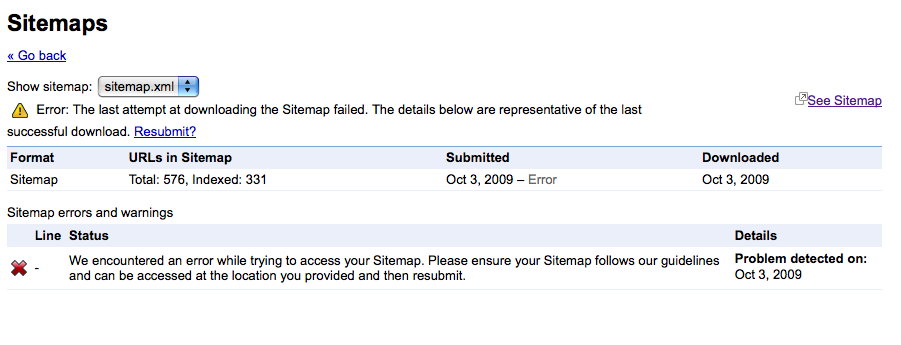
According to my Google Webmaster Tools account, my recent sitemaps.xml file resubmission appears to have been successful.

Google Sitemaps No Errors

Google Sitemaps No Errors

Although approximately half of my pages are being indexed by Google, I remain encouraged by the message above.

Google Webmaster Tools Sitemaps

October 3, 2009

I purchased domain mapping from WordPress.com to move posts from this blog’s original address @ cohn.wordpress.com to my SearchMarketingCommunications.com domain.

After I bought the domain mapping service, my blog went from having a Page Rank of 5 to a Page Rank of 0.

To add insult to injury, my WordPress blog then effectively lost most of its several hundred visitors a day traffic.

To keep up with the carnage, I added Google Webmaster Tools to the site as suggested.

Although I have been able to get some of my pages back into Google’s index, my site’s Page Rank has not returned nor has my traffic.

I recently resubmitted my WordPress sitemap after Google Webmaster tools said it discovered errors.

Google Webmaster Tools Sitemaps

Google Webmaster Tools Sitemaps

I am waiting to see whetherthe WordPress. com sitemaps.xml file I have submitted will be error free or not.

Sitemaps Resubmitted

Sitemaps Resubmitted

Adwords Interface Total All Campaigns Columns Mismatched

October 2, 2009

Google Adwords recently added a view-through conversion column to display a new level of content network ad performance data in the Adwords interface.

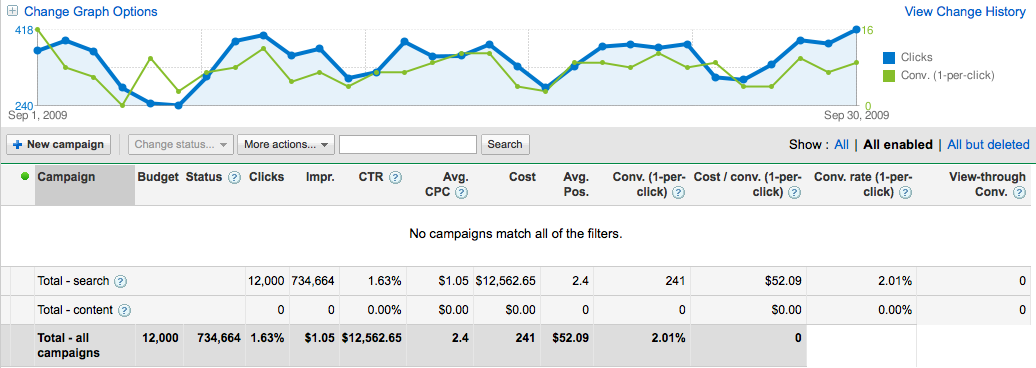
While studying the September performance of one of my accounts, I noticed the “Total – all campaigns” horizontal table at the bottom of my account was askew relative to their vertical table category counterparts.

The addition of the new “view through conversions” table appears to have not yet been integrated into or matched with the total all campaigns fields.

In the screen shot below, I paused all of my campaigns to illustrate how the column categories at the top don’t match up with the total all campaigns data at the bottom.

Adwords Interface Display Columns

Adwords Interface Display Columns

I thought I might possibly be getting mismatched data because I hadn’t scheduled any content network advertising.

Without content network advertising enabled, the account won’t be receiving any view-through conversion data.

Nope.

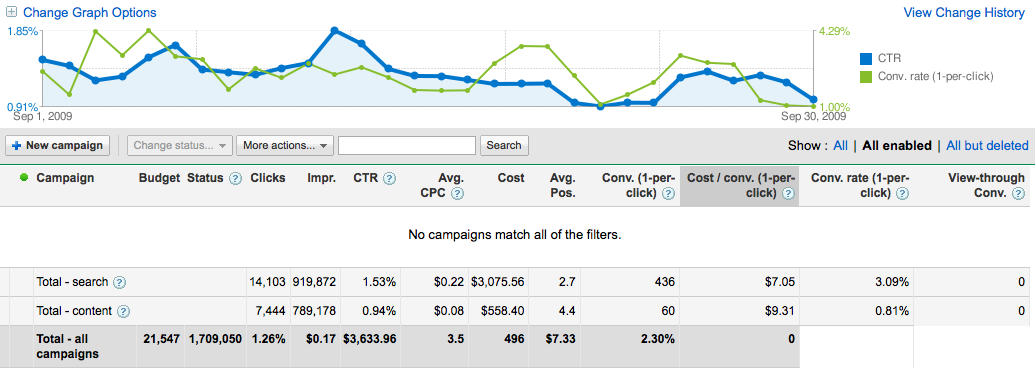
I went to one of my accounts where content advertising is scheduled and although I have yet to receive any view-through conversion data – this account too has mismatched total all campaigns columns and data.

Content Network Enabled Interface Display

Content Network Enabled Interface Display

As you can see in both accounts with and without content advertising enabled, the Clicks, Impressions, CTR, Avg. CPC, Cost, Avg. Pos., Conv. (1-per-click), Cost / conv. (1-per-click), Conv. rate (1-per-click) and View-through Conv. are instead positioned and aligned over the
Budget, Status, Clicks, Impressions, CTR, Avg. CPC, Cost, Avg. Pos., Conv. (1-per-click) and Cost / conv. (1-per-click) columns.

I am not a programmer, but it appears the Adwords team needs to add the Budget and Status columns to get all of the totals columns aligned properly.