Archive for the ‘Google Maps’ Category
November 4, 2008
MapMash has produced a pretty cool interactive US Electoral College map in Google Maps.
The MapMash map has eight different 2008 electoral college polls preloaded for comparing poll results from CNN, MSNBC, New York Times, USA Today, Pollster.com, Real Clear Politics, 270toWin.com and Politico.com

MapMash
I don’t know when the polls were conducted but their results vary widely.

US Electoral College Map
Google Maps users can click each state to see how its electoral votes could affect the 2008 election outcome.
Reset the map from the “Submit Your Prediction” drop down box to generate your own personal prediction of the electoral college vote outcome.

Reset
Click twice on a state to switch votes from Obama to McCain or vice versa when to create your own custom electoral college map.

US Electoral College State Map
Overall, MapMash has created another cool use for Google Maps.
Tags:270ToWin.com, CNN, Google Maps, MapMash, MSNBC, New York Times, Politico.com, Pollster.com, Real Clear Politics, US Electoral College, USA Today
Posted in 270ToWin.com, Google Maps, MapMash, Politico.com, Pollster.com, Real Clear Politics, US Electoral College | Leave a Comment »
November 2, 2008
After reading Danny Sullivan’s post about his and Mike Blumenthal’s continued frustration with Google’s Local Business Center and its shortcomings, I went to check the status of my recent attempts to further manage my business listing and its details in Google’s Local Business Center.
I was surprised to learn my listing edits were disapproved for reasons which weren’t fully explained other than through a pop up which said: “This listing does not comply with our policy of allowed terms.”

Policy of Allowed Terms
I haven’t yet been able to locate their policy of allowed terms.
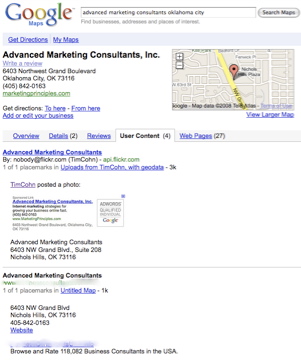
Fortunately and because the Google Local Business Center still has room for improvement – my business listing can be found in a Google or Google Maps search for Advanced Marketing Consultants Nichols Hills, OK.
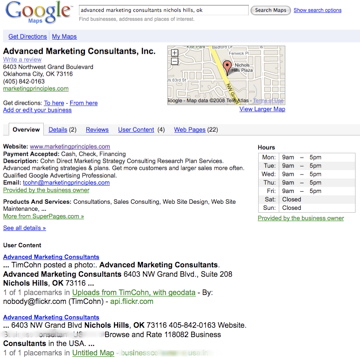
Google Local Business Center Overview
However, so can my competitor’s “listings”.
I was even more surprised to find information other than data directly related to my business inserted into both the Overview and User Content sections of my business listing by a “consultants directory” which effectively submarines my listing – not once but three times – all with the same “information” from the same “consultants directory”.

Marketing Consultants
I am not sure these are the type of search results Google wanted to see occur when they opened up and allowed “user generated content” within Google Maps – yet these types of results are now appearing there.
How long will it take before every business category gets submarined by directories who spam Google Maps with their “Placemarks” on “Untitled Maps” under the auspices of “user content”?

Placemarks Untitled Maps
I don’t know exactly how Google can stop spammers from generating “Placemarks” on “Untitled Maps” which in turn get published under unsuspecting business owner’s business listings.
Surely though since Google created the “User Content” system – they can also fix it.
Tags:Consultants Directory, Google Maps, Local Business Listings, Placemarks, Search Results, Untitled Maps, User Content
Posted in Google Local Business Center, Google Maps, Google Search Results, Local Business Listings, Placemarks, Untitled Maps, User Content | Leave a Comment »
October 24, 2008
Today when I was logging into my Google Adwords account, I received the first non Google message I can ever remember receiving in My Client Center: “Vote On November 4th.”
Accompanying the reminder to vote message were two links: one to Google’s 2008 Voter Info Map and the other to: Find your local polling place.

Vote on November 4th
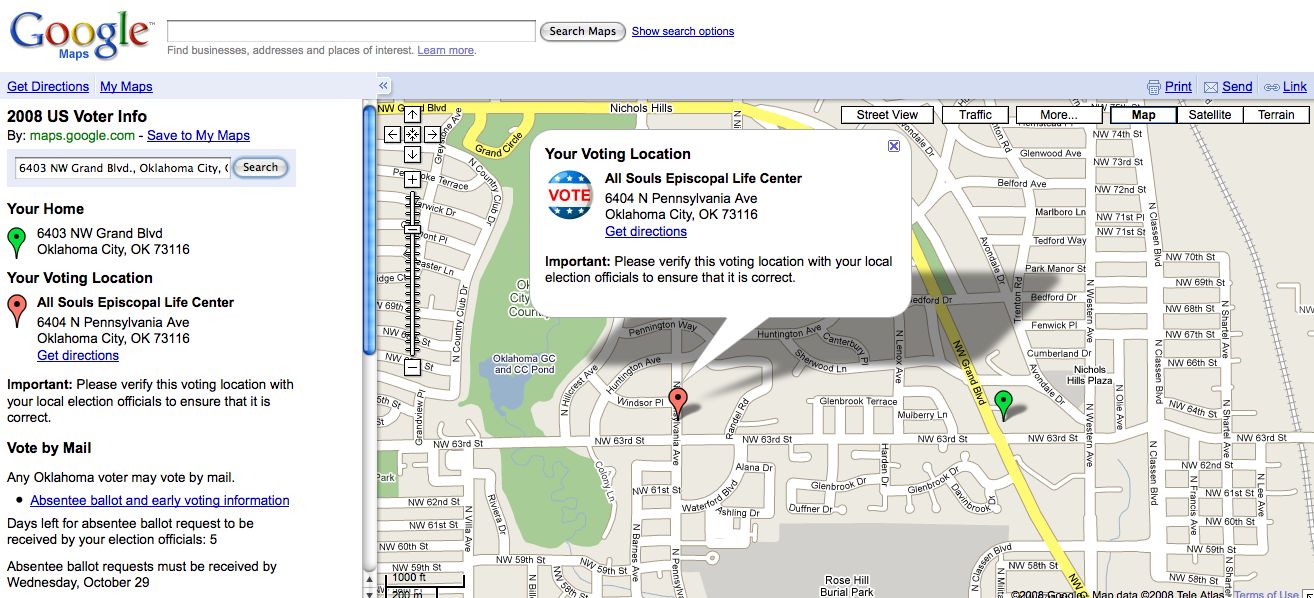
The first link took me to Google Maps and their 2008 US Voter Information search box. Here visitors can find their neighborhood voting location by entering their home address.
According to Google, their local polling place Maps were developed with help from state and local election officials and the Voting Information Project in conjunction with the League of Women Voters.
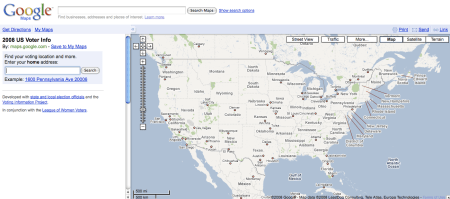
Where To Vote
I entered my address and sure enough I received the correct location for where to vote within my local precinct.

Locate Polling Place
Google Maps suggests searchers who have looked for and found their local polling place in Google Maps verify their voting location with local election officials to ensure that it is correct.
Google Maps also provides a link to absentee ballot and early voting information for how to “Vote by Mail” as well as how much time is left for voting by mail within a particular state.
Google’s 2008 Voter information Map is a great starting point for any voter who is looking for more information about where to cast their votes in the 2008 Presidential Election on November 4th, 2008.
Tags:2008, 2008 Presidential Election, Absentee Ballot, Election Officials, Google Adwords, Google Maps, League of Women Voters, Local Polling Place, My Client Center, November 4th, Remember to Vote, Vote by Mail, Voter Information Project, Where To Vote
Posted in Absentee Ballot, Election Officials, Google Adwords, Google Maps, League of Women Voters, Local Polling Place, My Client Center, November 4th, Remember to Vote, Vote by Mail, Voter Information Project, Where To Vote | Leave a Comment »
October 16, 2008
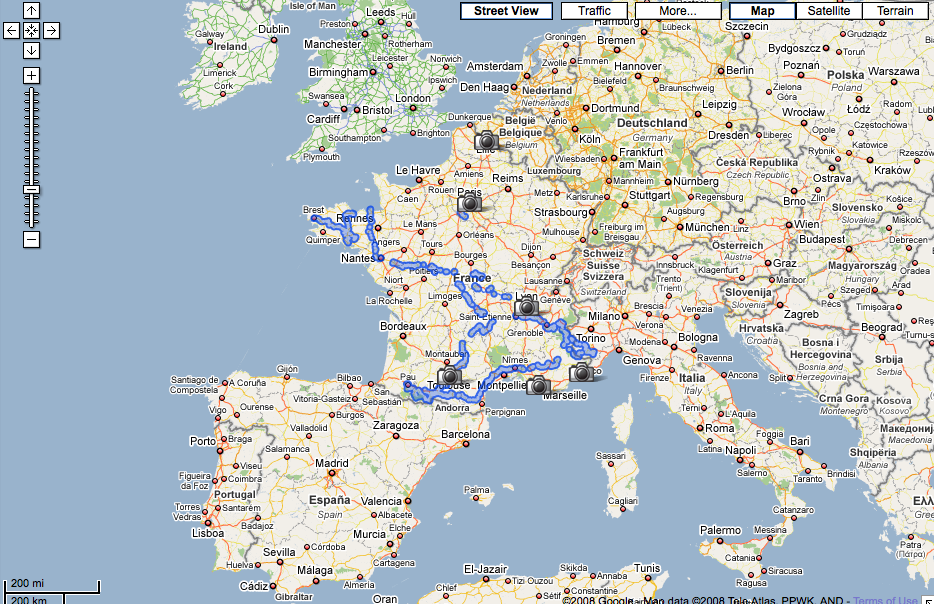
Google Maps now have Street View available live in France.
To get an idea of which cities in France have Google Street View available, search Google Maps for “France” and switch to the street view tab.

Google Street View France
This will give you a general idea of where Google has street view images available in France.
Next, search street view while in Google Maps for a specific city within France to see whether the city has been photographed yet or not.
This image indicates Paris, France has live Google street view images.

Paris France Google Street View
A search for Eiffel Tower Paris France then produces a view from the base of the Eiffel Tower.
Clicking or moving the orange person icon onto any blue street and panning the camera image can give you a better perspective of any location or landmark as in the picture below.
Welcome to the Eiffel Tower.

Eiffel Tower
Tags:Eiffel Tower, Google Maps, Google Street View, Paris France
Posted in Google Maps, Google Street View | Leave a Comment »
October 11, 2008
I was giving a presentation in Utah last week using Google Local Search and Google Maps as examples which evidently included new distribution points for Adwords advertising.
In the examples below, you can see an Adwords ad displayed in two locations in both types of Google Maps products being searched.
A search for Trump Soho Hotel in Google Maps produces two Adwords advertisers ads – one in the top left corner above Google’s local search results with the other ad below the map itself.

Trump Soho Hotel Google Maps
The same search in Google Street View also generates two Google Ads in the same locations as in the Google Map view search.
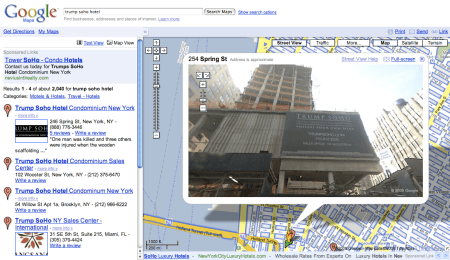
Trump Soho Hotel Google Maps Street View
Its not clear to me as a Google Adwords advertiser just how I can get my ads distributed and displayed in these local map search results.
None of my geo-targeted Adwords campaigns are generating these types of ad distribution results.
Tags:Adwords, Geo-Targeted, Google Maps, Google Street View, Local Search
Posted in Google, Google Maps, Google Street View, Local Search | Leave a Comment »
September 18, 2008
The teams from Google Earth and Maps have assembled images and resources for Galveston Texas residents displaced by Hurricane Ike as well as state and local emergency management personnel.
Within hours after Hurricane Ike’s arrival the National Oceanic and Atmospheric Administration’s Remote Sensing Division began flying rapid response aerial reconnaissance missions of the Texas and Louisiana Gulf region.

NOAA Remote Sensing
The NOAA Remote Sensing team has published the data they have collected on their official Hurricane Ike response page.

Hurricane Ike
The images posted on NOAA site are of the coast of Texas and Louisiana after Hurricane Ike made landfall.
The NOAA Remote Sensing Division gathered their Hurricane Ike images to meet NOAA national security and emergency response requirements.
The NOAA data will also be used for ongoing research efforts to test and further develop standards for airborne digital imagery.
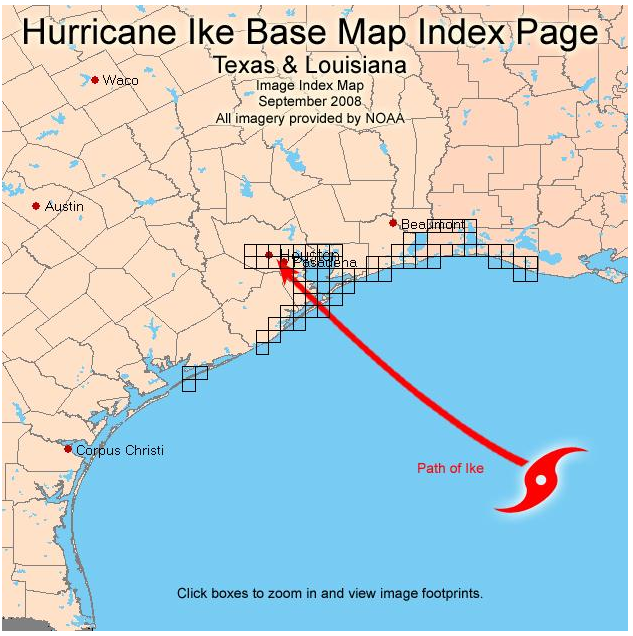
To see pictures of Galveston and the Texas coastline in the aftermath of Hurricane Ike, click on the NOAA base map grid boxes.

Hurricane Ike Image
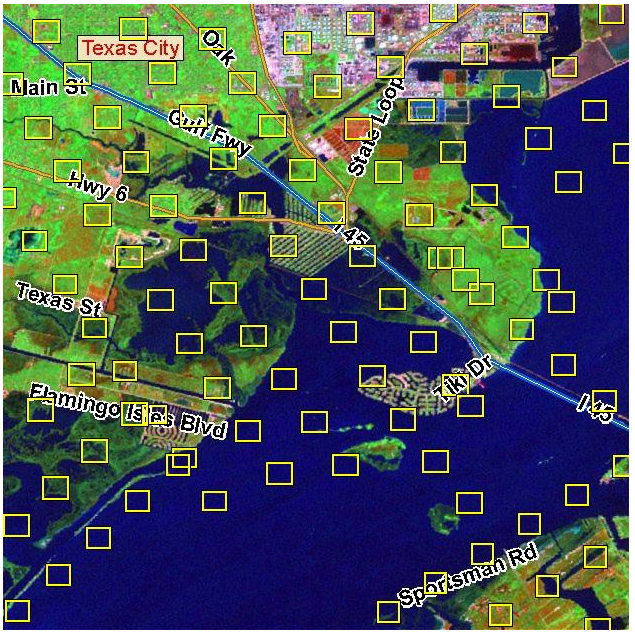
You can then drill down to each NOAA picture taken after Hurricane Ike made landfall.

Hurricane Ike Damage
The Google Earth and Google Maps teams have also processed the National Oceanic and Atmospheric Administration data it into a KML image overlay for easy access.
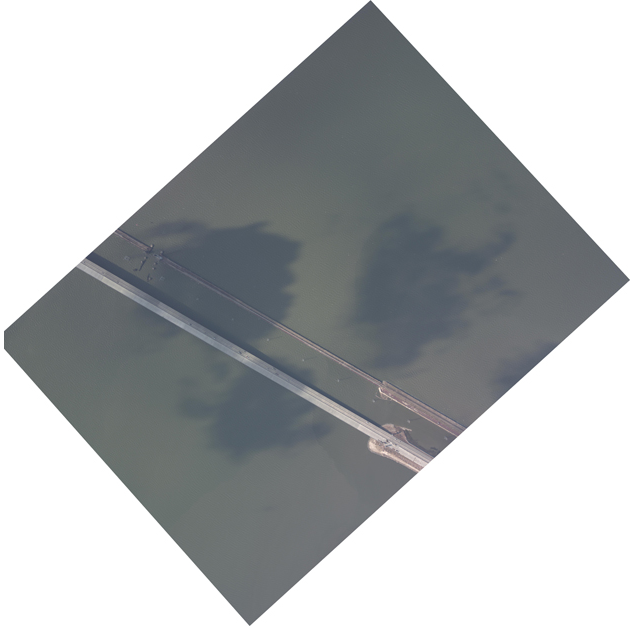
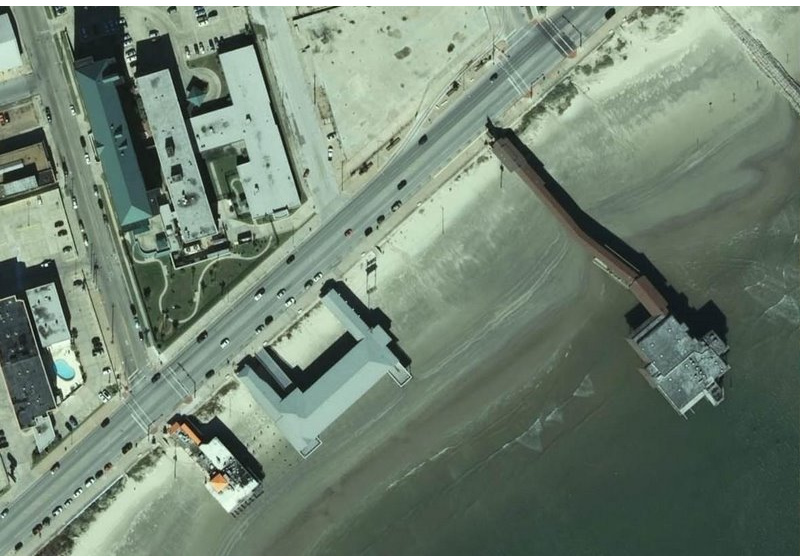
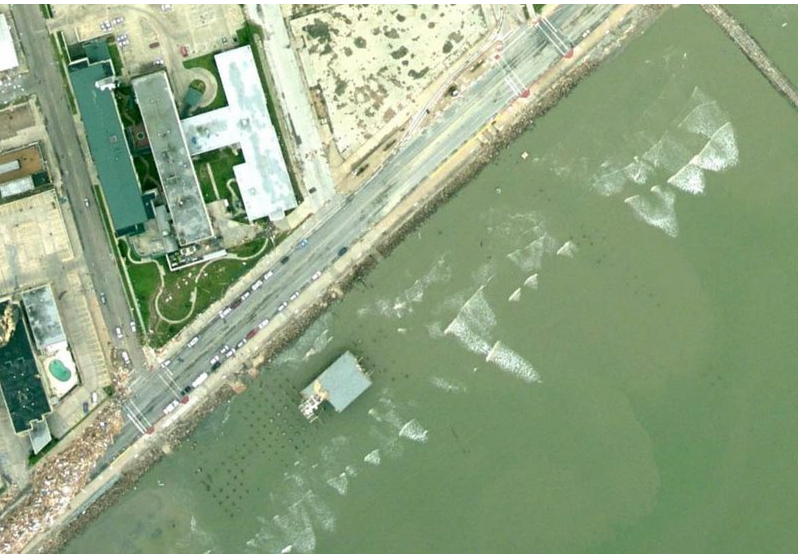
Here is just one example of the type of before and after pictures you can view of Galveston, Texas after Hurricane Ike struck the Texas Gulf Coast.

Hurricane Ike Before Picture
Hurricane Ike Before Picture
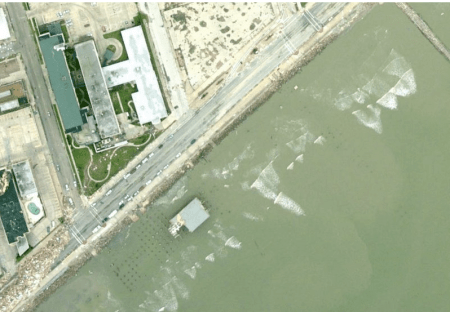
Hurricane Ike After Picture
Hurricane Ike After Picture
Tags:Airborne Digital Imagery, Galveston Texas, Google Earth, Google Maps, Hurricane Ike, Ike Pictures, NOAA
Posted in Galveston Texas, Google Earth, Google Maps, Hurricane Ike, Hurricane Ike Pictures | 2 Comments »
September 12, 2008
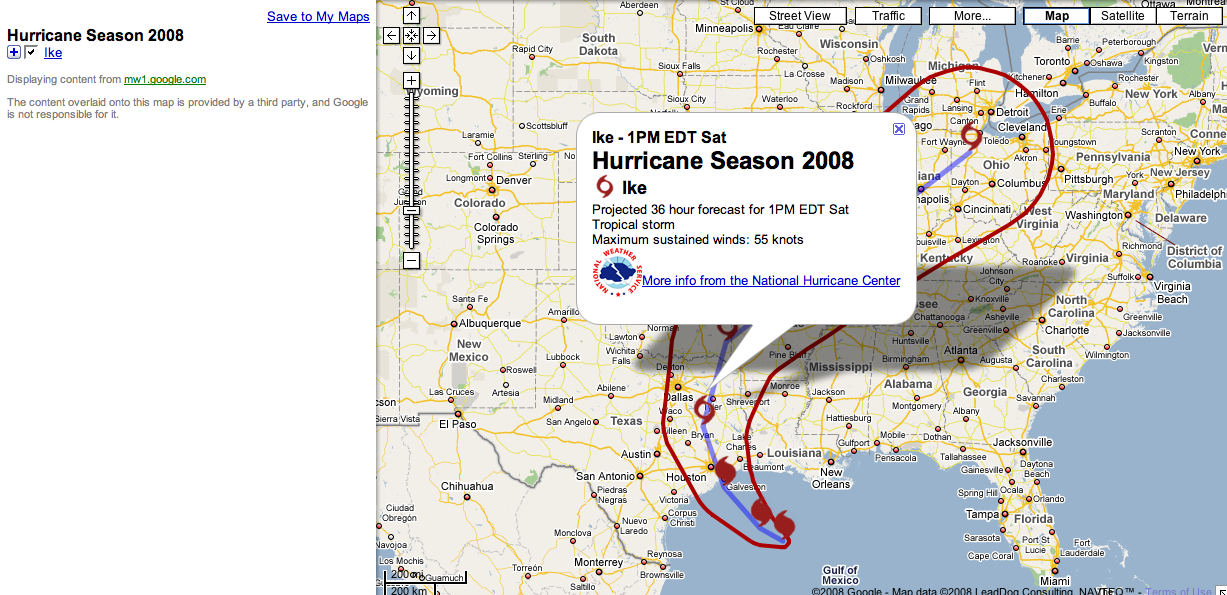
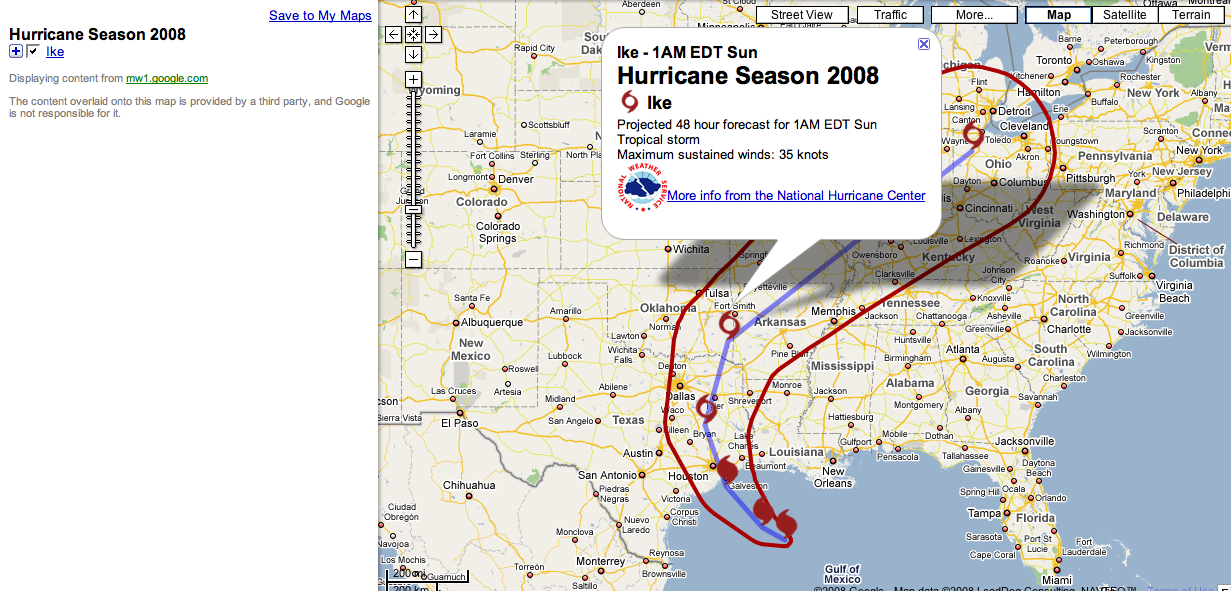
Google Maps is providing a convenient weather forecast map overlay of Hurricane Ike and its projected path over the next 24, 36 and 48 hours.
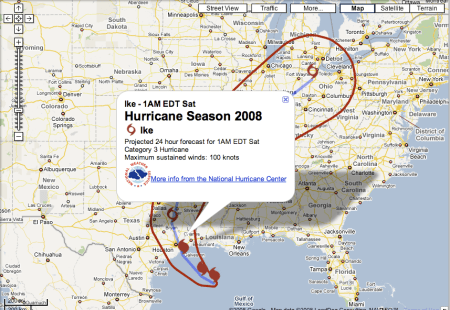
Hurricane Ike 24 Hour Forecast
Hurricane Ike: Galveston Island, TX 24 hour weather map forecast
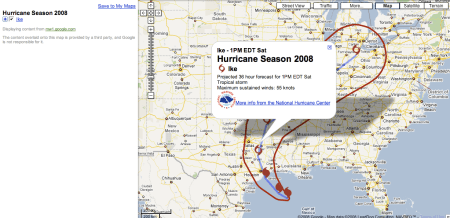
Hurricane Ike 36 Hour Forecast
Hurricane Ike: Houston Texas, Central Texas 36 weather map forecast

Hurricane Ike 48 Hour Forecast
Hurricane Ike: Texas and Oklahoma 48 hour weather map forecast
Google Maps is also providing a third party’s “Rising Sea Simulator” for visualizing storm surge levels but according to HeyWhat’sThat.com:
“We’re currently seeing heavy demand on our servers, so for now you’ll have to hit ‘Go’ whenever you move or zoom the map to load the overlay images.”
I had difficulty getting their application to load and couldn’t get it to produce a storm surge map for Galveston Bay or Galveston Island other than from space.

Storm Surge
To get more information about Hurricane Ike and its status, a quick Google search for Galveston web cams, Galveston newspapers or Galveston TV Stations will produce a list of other Hurricane Ike news sources.
I tried to access most of Galveston Web Cameras listed but they too were experiencing heavy usage and didn’t load very fast (less than 90 seconds).
Overall, it won’t be a good day to be in the Galveston Bay and Beach area.
Tags:Galveston Beach, Galveston Island Texas, Galveston Webcameras, Google Maps, Hurricane Ike, Storm Surge
Posted in Galveston Texas, Google Earth, Google Maps, Hurricane Ike, Storm Surge, Webcameras | Leave a Comment »
August 20, 2008
Google has been busy populating their maps product with more street level view pictures.
To see whether or not your city has been captured on film or not, go to Google Maps and select street view.
Google Maps shows which cities have been photographed or not.

Google US Street View
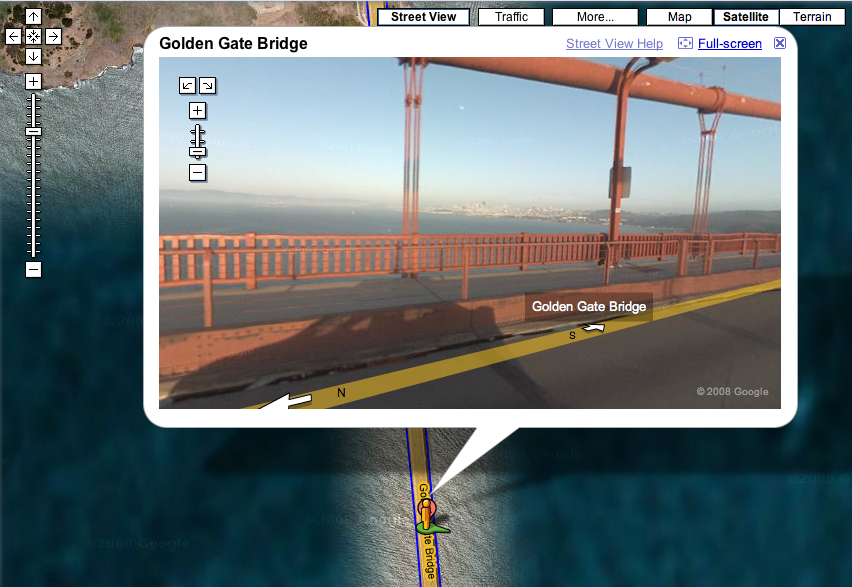
Next drill down to your particular city and location by inputting the address, city and state or in the case of a specific landmark like the Golden Gate Bridge – just enter the landmark’s name with or without the city

Golden Gate Bridge San Francisco CA
Click on the street view link and you will get a photograph which can then be tilted up and down or rotated 360 degrees to view different angles of the location Google has mapped.

Golden Gate Bridge
In this case you can see the Golden Gate Bridge, the San Francisco Bay and the San Francisco skyline all at once.

San Francisco Bay
Tags:Golden Gate Bridge, Google Maps, Google Street View, Landmark
Posted in Golden Gate Bridge, Google, Google Maps, Google Street View, Landmark | Leave a Comment »
February 29, 2008
I bought a Trackstick II Personal GPS Tracker today to try out over spring break.

Tracksticks are tiny GPS location recorders capable of continuously logging their own location histories for extended periods of time.
The Trackstick records its own location, time, date, speed, heading and altitude at preset intervals from anywhere on Planet Earth. I can set the record time intervals to once every 5 seconds or from once every minute to once every 15 minutes.
It includes a GPX photo stamping feature for adding my favorite photos to my own maps too.
I can view my travels in Google Earth, Google Maps and Microsoft Live.
I am going to see if and how well it works in the “user-created content” section of Google Maps.
Amazing.
Tags:Search Marketing
Posted in Google Earth, Google Maps, GPS, Microsoft Live, Trackstick Personal GPS Tracker, User Created Content | Leave a Comment »












 Search Marketing Communications
You must be logged in to post a comment.