Archive for February 8th, 2008

Mobile Search and Reverse Business Telephone Number Lookup, a Visual 411

February 8, 2008

As local information requests are being keyed in from mobile devices, 411 and driving directions are becoming more visually rich and available via search.

Case in point: The business telephone number reverse lookup.

How does Microsoft’s Live render a reverse lookup for Microsoft’s own telephone number? Microsoft delivers the correct result along with the five previously mentioned view options: Road, Aerial, Hybrid, Bird’s Eye and Traffic. The map view does however default to Chicago, IL even though Microsoft is located in Bellevue, WA.

I can find the Microsoft campus on the map after scrolling over a couple thousand miles. I ran several more queries with each defaulting to the same Chicago starting point. I am not logged into a Microsoft account so I wouldn’t think it was based on my computers cookies or IP address which by the way is still several hundred miles south.

Evidently, Microsoft, Yahoo and Google all seem to generate their map results based on your past location specific searches.

Microsoft’s reverse lookup offers: 1 Click Directions, Add to collection, Send to Email, Mobile and GPS and Reviews. The send to GPS requires MSN Direct compatible navigation systems.

Reverse Business Lookup– 425-882-8080 Microsoft

Microsoft 425-882-8080

Microsoft 425-882-8080

A reverse lookup for Yahoo’s telephone number in Yahoo produces two results both of which are Yahoo locations. The map provides the same functionality found in their standard searches: Get Directions, Save for later, Send to phone and Write a review. If a web address is associated with the location it will be displayed too.

Reverse Business Lookup– 408-349-3300 Yahoo

Yahoo 408-349-3300

Yahoo 408-349-3300

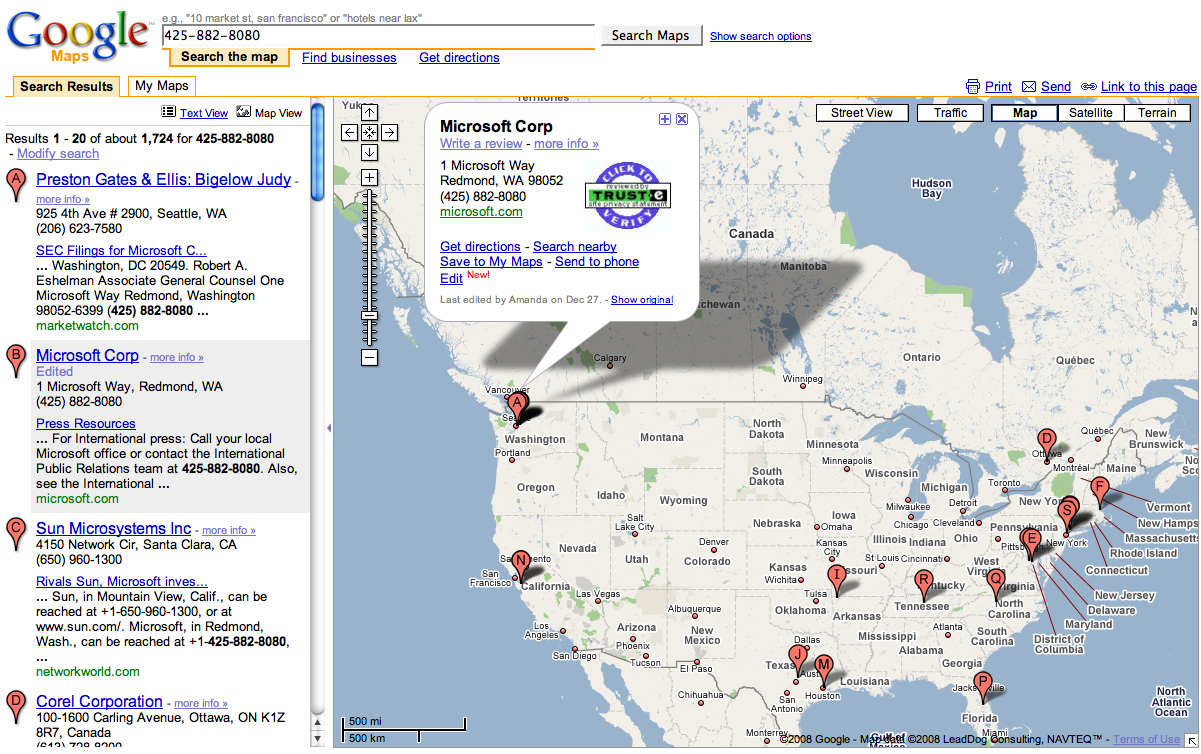
A search for Google’s telephone number yields the same five view options: Map, Street, Traffic, Satellite and Terrain Views as with the brand or business category search before. Additionally, Google provides a dialogue box with more options.

Searchers options are: Get directions, Search nearby, Street view, Save to My Maps, Send to phone and Edit. More information about the business and reviews are also one click away.

With “Search nearby” a searcher can locate additional businesses and services like finding Chinese takeout from their hotel.

Where Microsoft’s Bird’s Eye view appears to have bested Google’s satellite view, Google’s “street view” takes visualization to the next level.

With Google’s street view, Google provides eye level images of locations. It’s not available in every area yet. Coordination with volunteer picture geotagging projects may eventually speed the population of their street level image file.

Google’s new Edit feature lets anybody correct the location of a business. It also prompts business owners to “claim” their business in Google’s Local Business Center. These two options should eventually help them improve their data.

Reverse Business Lookup – 650-253-0000 Google

Google 650-253-0000

Google 650-253-0000

Google Street View

Google Street View

Edit Map Feature

Reverse Lookup Edit

By pushing more information out to users third screen (mobiles), Google, Microsoft and Yahoo regardless of their corporate status, have greater potential to attract ever-larger audiences and their keystrokes – a situation where all consumers ultimately win.

Before and After Picture: Local Search Engine Optimization in Oklahoma City

February 8, 2008

The following email came from a client who received a “targeted” search engine optimization services pitch from a search engine optimization salesman who was prospecting for clients.

I changed the search engine optimization company and client names.

This is after my optimization of their old website started “miraculously” producing over 4,000 web visitors per month and new business – telephone calls, online and in store sales – where none had came from before.

Clients amaze me!

Hi Tim-

What do you think about this e-mail? I thought this was what your website optimization was supposed to accomplish. Help?

[Preferred Client]

—–Original Message—–
From: [ABC SEO Company]

Sent: Wednesday, February 06, 2008 3:14 PM
To: Website owner
Subject: Attn: [Jane Doe] Regarding [preferredclient.com]

Hello [Jane],

I was recently looking through [ABC Consumer] magazine and saw your advertisement. I took a look at your website and found it very appealing. I decided to do a little research on Google to see if your website was on the first page.

I searched for “[general product term] Oklahoma City” and your site did not come up in the natural search results on Google. I then tried “[another general product term] Oklahoma City” and even “[and even another general product term] Oklahoma City” again with no results. Potential customers are currently using keyword phrases similar to these to search for a company like yours. [PreferredClient.com] could and should be on the first page of major search engines like Google, Yahoo and MSN.

I work for ABC SEO Company, a search engine marketing firm. We help position websites on multiple search engines so you will come up for targeted keywords. It is surprising how many more customers you can attract with online marketing. If you have a couple minutes I would be happy to give you some information on how our services could benefit your business.

Please let me know if you have a few minutes to talk.

Best Regards,

ABC SEO Salesman

Research and Development
ABC SEO Salesman

PH: xxx-xxx-xxxx
Fax: xxx-xxx-xxxx

My response:

Hi [Preferred Client],

Well, my work sent 4,127 visitors from 11 different search engines between January 6, 2008 and February 5, 2008 via 1,528 keywords whereas prior to my work your site received 0 visitors monthly via 0 search engines.

During the same time period the visitors who came to your site via the 11 search engines on average viewed 13.46 pages each and spent 3:48 of their time on your site.

84.01% of the 4,127 visitors who arrived at your site via search engines had never been to the [PreferredClient.com] website before.

Search Engine Optimization

I don’t know whether the progression from 0 searches to 1, 2, 3 searches etc. is considered arithmetic, geometric or quadratic but I think the difference is quantifiable.

I also don’t know how many searches he thinks his recommendations would yield daily, weekly, monthly or yearly but I would definitely ask him for his estimate.

I think all you can do when you receive these type of emails is ask the sender what kind of search traffic they estimate their recommendations will deliver and then weigh their response with what your before and after search experience has been and is now.

I think only then would you have the necessary information needed for deciding whether pursuing their recommendations or not would be in the best interest of your business.

Wouldn’t you agree?

Let me know if there is anything else I can do for you.

Thanks and all the best,

Tim Cohn