Archive for May 1st, 2008

Microhoo Boo

May 1, 2008

According to today’s online edition of the Wall Street Journal, Microsoft’s Chief Executive Office Steve Ballmer and it board remain undecided about whether or not they will raise their bid to acquire Yahoo and its internet display advertising and search audience business.

As I previously wrote in a post on Greg Sterling’s blog, Microsoft’s proposed acquisition of Yahoo is really about Microsoft’s need to retain, preserve and grow their existing audience and keystrokes before Google has completed their quarterback sneak through Microsoft’s desktop.

Without Yahoo and its internet audience, Microsoft will face accelerating short and long term audience losses to Google.

The question Microsoft hasn’t yet been able to answer for itself remains: “How much cash do we have to spend today to save and protect the future of our desktop franchise and its cash flow?

Apparently the price is one Microsoft has yet to come to grips with or let go of.

Internet Connection Speed Test

May 1, 2008

Today I was having problems with my Internet connection and had to jump through a bunch of hoops to figure out what was causing the problem.

After jacking around with my modem and wireless router for what seemed like an eternity, I determined the problem was the new unfiltered telephone I had installed yesterday.

While on my telephony science fair project, I got reacquainted with the internet speed connection test.

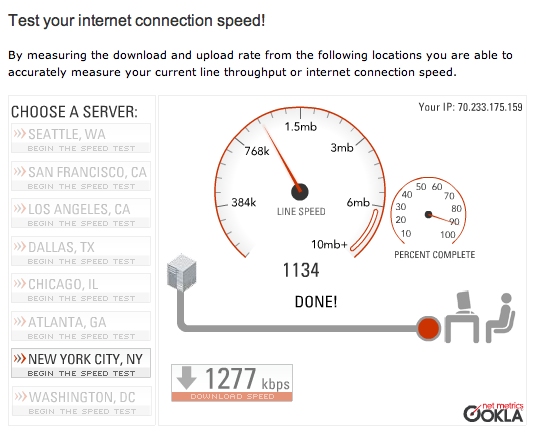
I found the Speak Easy test easy to use.

Internet Speed Connection Test
From their site: “By measuring the download and upload rate from the following locations you are able to accurately measure your current line throughput or internet connection speed.”

My Internet speed connection results were as follows:
Download Speed: 1277 kbps (159.4 KB/sec transfer rate)

Download Speed
Upload Speed: 313 kbps (38.6 KB/sec transfer rate)

Upload Speed

There are a lot of things that factor into your speed test results. Download and upload speeds, backbones, networks, latency, ping times, and DNS servers.

The following are some common internet speed connection terms to help you understand internet speed connection test results.

Download is a measure of how fast your internet connection delivers content to your computer or local area network.

Upload is the measure of how fast content is delivered from your computer or local area network to others on the Internet.

Download and upload speed should match or at least be very close for applications like VoIP, email, on-line gaming and other interactive programs. Upload speed is even more important if you are operating an email, web or file server at your location.

Kbps
Kbps transfer rate = kilobit per second transfer rate. There are 8 bits in a byte, so we would divide kbps by 8 to get KB/sec transfer rate.

Now get back to uploading and downloading…